Black Friday 2026
Managed Switch Black Friday Deals UK 2026
Prices checked
Amazon UK’s 2026 Black Friday sale runs from 19 to 30 November. Black Friday is 27 November. Prices below come from the latest available listing checks.
As an Amazon Associate we earn from qualifying purchases. Prices and availability come from Amazon.co.uk as of the last update and may change.
If you are buying a managed switch for a NAS setup, start with the network design rather than the sticker on the box. The right choice is usually the one that can separate storage traffic from the rest of the home or office network, match the NAS ports you already have, and leave room for growth without paying for features you will never use. Check the manufacturer’s specification sheet and the product listing for VLAN support, link aggregation, port speeds, PoE if needed, and whether the admin tools suit how you want to manage the network.
Matching Amazon UK listings
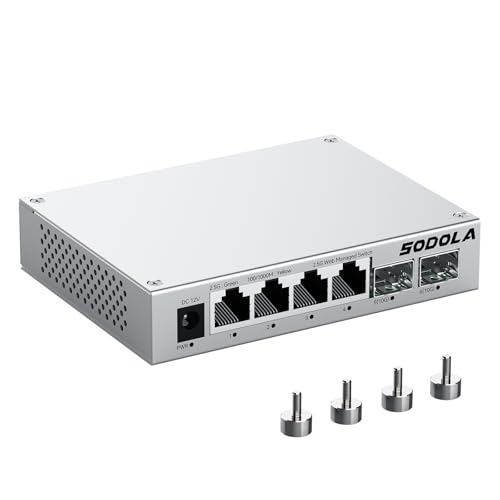


The listing’s condition and last check are shown on each row. Prices and availability may change at checkout.
Is it really a deal?
5 listings are at or near our recorded low. We compare the same Amazon listing and condition against earlier prices we recorded. Near our low means within 3% of that low. An Amazon reference price shows the retailer’s comparison figure. Check the retailer for any current promotion or access requirements.
1. Match the switch to the way your storage network will be used
A managed switch is useful when your NAS should sit on its own VLAN, or when you want storage traffic kept separate from user devices, printers, cameras, or guest Wi-Fi. That separation can reduce congestion and make the network easier to organise. For a simple home NAS that only serves one or two devices, a basic managed model may be enough. If you plan to segment traffic, look for 802.1Q VLANs and straightforward port-based VLAN setup, because those are the common tools used to place the NAS and selected clients on a storage-only network.
If you do not need VLANs, access control lists, SNMP, or link aggregation, a simpler switch may be the better buy. In that case, money saved on management features can go towards more ports or faster interfaces elsewhere. A closely related alternative, such as a simpler NETGEAR switch, can make sense if you want a familiar brand interface but only need a straightforward expansion point rather than a fully segmented storage network.
2. Check the management features that actually matter for NAS traffic
For NAS use, the most useful features are usually VLANs, link aggregation, IGMP snooping, and basic QoS. VLANs let you separate storage traffic from general browsing or media devices. Link aggregation only helps if both the NAS and the switch support it, and it is best treated as a resilience and multi-client feature rather than a promise of one very fast transfer. Verify that the NAS documentation says it supports the same aggregation mode the switch offers, such as LACP, before assuming compatibility.
IGMP snooping can be helpful if your NAS is serving multicast media to several devices, while QoS can help prioritise storage traffic in busy mixed networks. If your setup is purely file storage, these features are useful but not always essential. Always check the exact feature list in the manual rather than relying on a marketing headline like “smart” or “managed”, because vendors use those labels differently.
3. Choose the right port mix and uplink options
Port count and port speed should reflect how many devices will share the switch and what the NAS can actually use. If the NAS has only one Ethernet port, buying a switch with multiple high-speed ports will not help unless other parts of the network also need them. If the NAS has two ports, confirm whether it supports link aggregation, or whether it is intended for separate networks instead. A switch with a mix of faster ports for the NAS and standard Gigabit ports for clients can be a good compromise when you have one storage server and several ordinary devices.
Also check whether the uplink is copper or SFP, and whether the switch can handle your cabling and patching plan. For a small office, a switch with one or two faster uplinks may be more useful than extra low-speed ports. If the listing is vague, look up the model page on the manufacturer’s site to confirm how many ports run at each speed and which ports are shared or dedicated.
4. Think about installation, power, and administration
Managed switches are not all equally easy to live with. Some are designed for console access and detailed configuration, while others offer a web interface that is simpler for non-specialists. If you only need VLANs and port settings, look for a clear web UI and a reset process you can manage without specialist tools. If the switch will sit in a cupboard or rack, check whether the chassis is fanless or actively cooled, whether it can be rack-mounted, and what power input it uses, because those details affect placement more than they affect the sales page.
For a NAS environment, it is also worth checking whether the switch supports mirroring or diagnostics, because that can help if you ever need to trace a cabling or traffic issue. These are maintenance features rather than must-haves, so do not overpay if you will never use them. The best value is often a managed model with the few controls you need and no extra complexity.
5. When a managed switch is the wrong choice
Choose a managed switch when you know you need segmentation, better traffic control, or a cleaner upgrade path. Choose something simpler when the NAS is the only advanced device on the network and everything else is plug-and-play. If your main priority is only to connect a NAS to a few devices in one room, a basic switch may be enough. If you need separate storage, guest, and office networks, the managed option is the better fit even if it costs more up front.
If you are comparing pages on this site, use the management angle to decide whether the extra controls are worth paying for. A brand-specific page such as NETGEAR can be useful when you already prefer that ecosystem or want to stay within one vendor’s app and support style. But if your main requirement is storage VLANs and controlled traffic separation, compare the actual feature list first and the brand second.
Frequently asked questions
Do I need a managed switch for a NAS?
Only if you want VLANs, link aggregation, traffic control, or clearer separation between storage and everyday devices. For a single NAS and a simple network, an unmanaged switch can be enough.
What should I verify on the listing and manufacturer page?
Check VLAN support, link aggregation mode, port speeds, any SFP or PoE details, and whether the admin interface is web-based or app-based. Also confirm the NAS supports the same features before buying.
Is link aggregation always worth it for a NAS?
Not always. It can be useful with multiple clients or for resilience, but it only works properly when both the NAS and switch support the same mode. It is not a substitute for faster individual ports.
When is a simpler alternative better?
If you do not need VLANs or traffic management, a simpler switch, including a basic NETGEAR model, may be better value and easier to set up.