Black Friday 2026
NVMe Enclosure Black Friday Deals UK 2026
Prices checked
Amazon UK’s 2026 Black Friday sale runs from 19 to 30 November. Black Friday is 27 November. Prices below come from the latest available listing checks.
As an Amazon Associate we earn from qualifying purchases. Prices and availability come from Amazon.co.uk as of the last update and may change.
An NVMe enclosure is only the right buy if it truly supports NVMe over PCIe, not just the M.2 card shape. That distinction matters because many enclosures accept the same physical stick but only work with M.2 SATA drives, while others are limited by the host link, cooling design or module length they can fit. Before choosing, check the enclosure’s interface standard, the supported M-key or B+M-key drive types, the length range such as 2230, 2242, 2260 or 2280, and the connection to your computer. If you need simple external SSD storage, a USB enclosure is often the practical route. If you need the fastest possible setup, or repeated heavy writes, confirm the host port and thermal design carefully rather than relying on the product name alone.
Matching Amazon UK listings


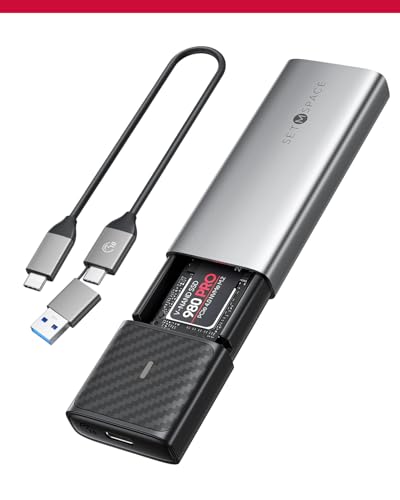

The listing’s condition and last check are shown on each row. Prices and availability may change at checkout.
Is it really a deal?
No recently checked listing has reached our recorded low. We compare the same Amazon listing and condition against earlier prices we recorded. Near our low means within 3% of that low. An Amazon reference price shows the retailer’s comparison figure. Check the retailer for any current promotion or access requirements.
1. Start with the drive type, not the shell shape
The first thing to verify is whether the enclosure supports NVMe, M.2 SATA, or both. A large number of listings use “M.2 enclosure” loosely, but M.2 is only the connector format. NVMe drives communicate over PCIe, while M.2 SATA drives use the SATA protocol. They are not interchangeable unless the enclosure is explicitly designed for both. If your SSD is an NVMe model, the listing should say NVMe, PCIe, or sometimes USB to NVMe. If it only mentions SATA, that is a sign to keep looking.
Check the keying on the drive and the enclosure specification together. NVMe drives are commonly M-keyed, while some M.2 SATA drives are B+M-keyed. That does not guarantee compatibility on its own, so use the manufacturer compatibility table where possible. For example, a 2280 NVMe SSD needs both NVMe support and 2280 support. If you already own the drive, match the exact model number against the enclosure’s compatibility notes before buying. If you are buying both together, confirm that the drive is listed as NVMe rather than simply M.2.
2. Match the host connection to the speed and use case
The enclosure is only as useful as the link to the computer. Many consumer models use USB, while others may use Thunderbolt or USB4. The important point is not the headline label alone, but what the enclosure actually supports at the host side. A fast NVMe drive in a slower USB link will work, but the connection can become the bottleneck. That may be fine for general file transfer, media storage, or a bootable portable drive, but it is worth checking if you expect sustained large-file work.
Look for the interface on both sides of the product details. Some listings describe the internal drive side as PCIe-based and the external side as USB 10Gbps, 20Gbps, Thunderbolt, or USB4. If your laptop only has USB-A ports, you may need an adapter or a different enclosure, but adapters can reduce convenience and sometimes performance. If you are choosing between a basic USB enclosure and a more expensive high-bandwidth model, the better choice depends on whether your computer can actually use the extra headroom. There is no point paying for a faster link that your host cannot provide.
3. Cooling and build quality matter more than glossy claims
NVMe drives can run warm, especially in compact enclosures and during long transfers. Good cooling is not just about comfort, it can influence how consistently the drive behaves under load. Check whether the enclosure includes a thermal pad, heatsink, aluminium body, or ventilation design. If the listing shows a solid metal shell, that may help with heat spreading, but only if the drive makes proper contact through the pad or internal structure. Plastic housings are not automatically poor, but they often rely more on passive airflow and less on heat dissipation.
The best cooling choice depends on how you plan to use the enclosure. For occasional document storage, a simpler shell may be enough. For backup jobs, video work, or repeated transfers, a better heat path is more useful. Be careful with very compact enclosures that promise pocket-friendly size while using high-performance NVMe drives. In that case, the drive can be more limited by temperature than by the storage technology itself. If the manufacturer provides thermal design notes, read them rather than assuming all metal enclosures perform the same.
4. Check length support, tool-free access and practical compatibility
M.2 drives come in different lengths, and the enclosure must support the one you own. The common sizes are 2230, 2242, 2260 and 2280, but not every enclosure fits all of them. A lot of listings support 2280 only, because that is common for full-size consumer SSDs. If you plan to use a shorter module from a handheld device or compact system, make sure the mounting point is adjustable and the spec names the correct size range.
Also consider how often you will swap drives. Tool-free enclosures are convenient, but the mechanism still needs to be secure enough to keep the module aligned and cooled properly. If you will leave one SSD installed for long periods, tool-free access matters less than a solid fit and reliable host support. For users who mainly need a simple external backup drive, a straightforward enclosure is usually better value than one with extra features you will not use. If your goal is to expand a laptop internally rather than carry a drive externally, a NAS or internal SSD upgrade may be the better alternative instead of an enclosure at all.
5. Use the listing and manufacturer page to confirm the details
Because product titles can be vague, verify the important points in two places. On the listing, look for the exact protocol, host interface, supported lengths, chipset notes if shown, and any included cable type. On the manufacturer page, confirm the same details in the compatibility chart or manual. If either source leaves out a key point, treat that as a warning sign and do not assume it will work just because the shape looks right.
A simple buying check is to ask four questions: does it support NVMe, does it fit my drive length, does it connect at a speed my computer can use, and does it manage heat well enough for my workload. If the answer to any of those is unclear, choose a different model. This is especially important when comparing enclosures that look similar but are built for different protocols. It is often better to buy a more clearly specified enclosure than to gamble on a cheaper listing with vague language.
Frequently asked questions
Is M.2 the same as NVMe?
No. M.2 is the physical format, while NVMe is the storage protocol. An enclosure can fit an M.2 drive and still only support M.2 SATA, so always check for explicit NVMe or PCIe support.
How do I know if my SSD will fit the enclosure?
Check the drive length and keying. The product page should list supported sizes such as 2230, 2242, 2260 or 2280, and it should state which drive types are supported. Match that against your SSD model, not just the connector shape.
Do I need Thunderbolt for an NVMe enclosure?
Not always. Thunderbolt or USB4 can be useful if you want higher bandwidth, but many people only need a good USB enclosure. The right choice depends on your computer’s ports and how demanding your use case is.
When is a NAS or internal upgrade a better choice?
If you want always-on shared storage, multiple drive redundancy, or a permanent storage upgrade rather than an external portable drive, a NAS or internal SSD solution is often more suitable than an NVMe enclosure.