Black Friday 2026
QNAP TS-673A Black Friday Deals UK 2026
Prices checked
Amazon UK’s 2026 Black Friday sale runs from 19 to 30 November. Black Friday is 27 November. Prices below come from the latest available listing checks.
As an Amazon Associate we earn from qualifying purchases. Prices and availability come from Amazon.co.uk as of the last update and may change.
The QNAP TS-673A is best approached as a capacity-first NAS, but the sensible buying choice is not just “how many bays.” Before you commit, check whether you actually need six drives, whether your planned RAID level matches the number and size of disks you want to buy, and whether any optional hardware or filesystem features are part of your plan. That matters because the real cost is the full drive set plus any extras, not the enclosure alone. If you only need simple shared storage or a small media library, a 2-bay or 4-bay NAS may be the better fit. If you want more usable capacity, room for RAID flexibility, or future expansion without replacing drives immediately, the TS-673A class makes more sense.
Matching Amazon UK listings
| Product | Details | Price | Recorded low | Price verdict | |
|---|---|---|---|---|---|
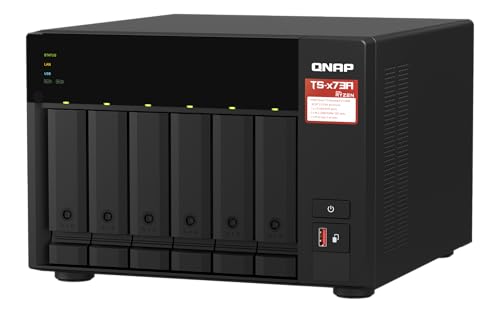 QNAP TS-673A-8G High Performance 6-Bay NAS with 2 2.5GbE Ports and Two PCIe Gen3 SlotsNew · checked | 6 bays · USB | £1,130.46£188.41/bay | £952.91 | Above our low | Buy on Amazon |
 TS-673A-8G, 6-Bay, AMD Ryzen quad-core 2.2 GHz 2.5GbE NAS supports M.2 NVMe SSD and PCIe expansion and PCIe expansion for 10GbENew · checked | 6 bays · NVMe | £1,254.77£209.13/bay | £1,266.29 | No history yet | Buy on Amazon |
The listing’s condition and last check are shown on each row. Prices and availability may change at checkout.
Is it really a deal?
No recently checked listing has reached our recorded low. We compare the same Amazon listing and condition against earlier prices we recorded. Near our low means within 3% of that low. An Amazon reference price shows the retailer’s comparison figure. Check the retailer for any current promotion or access requirements.
Start with capacity, not the bay count
A six-bay NAS only makes sense if you can use those extra slots. For a home office or small team, that may mean separate shares for projects, backup copies, and archive data. For example, six smaller drives in RAID 6 can give you more fault tolerance than a two-drive mirror, but the usable capacity depends on the exact drive sizes you choose and the RAID level you set. Always check the maximum drive compatibility and supported RAID modes on QNAP’s product page and compatibility list before buying. Do not assume every SATA drive will be equally suitable just because it fits the tray.
A practical rule is to buy for the storage you expect to need in the next two to three years, not just today. If you think you may outgrow a 2-bay or 4-bay unit, a six-bay model can reduce the chance that you will need to replace the whole chassis later. If, however, your storage needs are modest and you value lower total disk cost, a smaller NAS may be the more efficient purchase.
Match the RAID plan to the drive set
The TS-673A’s value depends heavily on how you intend to configure the disks. RAID 1 or RAID 10 is simpler to understand, but it gives up more usable space. RAID 5 and RAID 6 usually make better use of six bays, though each has different tolerance for drive failure and different rebuild behaviour. If you are buying larger drives, think about the rebuild time and what happens if another drive fails during rebuild. The right answer depends on how important uptime is versus how much capacity you need.
For a mixed-use NAS, it is often better to choose one clear plan before you buy any disks. For instance, if you want a photo archive and business file share with reasonable fault tolerance, you might choose six identical drives and a RAID 6 or ZFS-style layout if the system and filesystem support it. If you only want a simple backup target, a less complex setup may be sufficient. Check the manual to confirm exactly which RAID and storage pool options QNAP offers on this model, because features can depend on the operating system version and configuration.
Check optional hardware before comparing alternatives
The TS-673A family may appeal because of optional hardware and upgrade paths, but you should verify what is included and what is separate. Look for details on memory configuration, M.2 or SSD cache support, 2.5GbE or 10GbE networking, PCIe expansion, and any tray or adapter requirements. These details affect total cost and can change whether the NAS is the best buy for your use case. Do not rely on a general impression that a model is “faster” or “more expandable”; confirm the exact ports and slots from the manufacturer spec sheet.
If your use case is mostly file backup, media storage, and occasional remote access, you may not need expansion cards or cache at all. In that case, a simpler NAS can be better value. But if you know you will want faster networking or an add-in card for a specific workflow, compare the TS-673A against the TS-873A or another higher-end enclosure only after checking the actual expansion options you need. The right comparison is based on your accessories, not just the number in the model name.
Filesystem and operating system choices matter
Not every NAS buyer needs to worry about filesystems, but if you are planning snapshots, deduplication, checksumming, or advanced data protection, you should check what the platform supports. On a QNAP system, the available filesystems and volume types may depend on model, firmware, and how you create the storage pool. That makes it important to read the setup guide before you buy disks. A drive set that looks ideal for simple shared folders may be less suitable if you later want a feature that needs a particular pool or volume type.
A useful example is a home photographer who wants a central archive with versioning. That person may value a filesystem and storage layout that supports snapshots more than raw capacity alone. By contrast, someone building a large shared folder for video files may care more about throughput, drive cost, and straightforward RAID. The TS-673A can suit either approach if configured properly, but the optimal choice depends on the storage design you choose at the outset.
When a smaller or related NAS is the better buy
A 2-bay NAS such as the TS-253E or TS-264 is usually the better choice if you want lower drive count, simpler setup, and lower total entry cost. It is also easier to manage if your storage needs are light or if you plan to rely on backups rather than RAID for resilience. A 4-bay model such as the TS-453E or TS-464 is often the middle ground, giving more flexibility than two bays without the full disk cost of six.
Choose the TS-673A only if you will genuinely use the extra bays, need more room for a mixed RAID or expansion plan, or want headroom for future growth. If you expect to build out a larger pool, the TS-832PX or TS-873A may be more relevant depending on whether you prioritise bay count, networking, or chassis class. The right decision is the one that matches your storage roadmap, not the one with the highest bay number.
Frequently asked questions
How do I know which drives are suitable for the TS-673A?
Check QNAP’s compatibility list and the official product specifications for supported drive types, sizes, and any limits on capacity or firmware. Also confirm whether you want NAS-specific HDDs, SSDs, or a mixed setup, and whether the intended RAID level makes sense for the drives you plan to buy.
Is six bays always better than four bays?
No. Six bays give more flexibility and can support larger usable capacity, but they also increase the cost of the drive set. A 4-bay NAS may be better if your storage needs are moderate and you want a simpler, cheaper build.
Should I choose NAS or DAS for this kind of setup?
Choose NAS if you want network sharing, remote access, or multiple users. Choose DAS if you only need direct connection to one computer and want a simpler, often cheaper enclosure. NAS is usually the better fit when the storage will serve several devices.