Black Friday 2026
Synology DS725+ Black Friday Deals UK 2026
Prices checked
Amazon UK’s 2026 Black Friday sale runs from 19 to 30 November. Black Friday is 27 November. Prices below come from the latest available listing checks.
As an Amazon Associate we earn from qualifying purchases. Prices and availability come from Amazon.co.uk as of the last update and may change.
The Synology DS725+ sits in the middle of a common NAS buying decision: start with a two-drive array and keep the box compact, or pay for a larger base enclosure so you can add capacity later without changing the platform. If you are weighing this model, the key question is not just how much storage you need today, but how quickly that need is likely to grow, how important drive redundancy is, and whether you want to avoid replacing the whole unit later. Use the live listing and the manufacturer’s spec sheet together to confirm the drive count, supported drive sizes, expansion options, network ports and any limitations that affect your own setup.
Matching Amazon UK listings


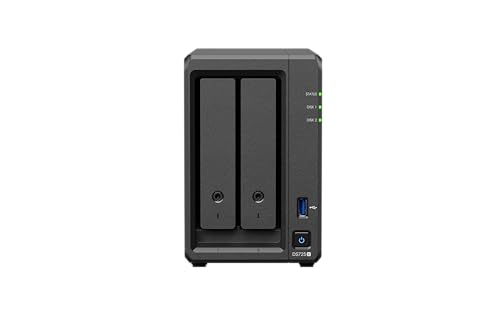

The listing’s condition and last check are shown on each row. Prices and availability may change at checkout.
Is it really a deal?
1 listing is at or near our recorded low. We compare the same Amazon listing and condition against earlier prices we recorded. Near our low means within 3% of that low. An Amazon reference price shows the retailer’s comparison figure. Check the retailer for any current promotion or access requirements.
Start with the storage shape, not just the headline capacity
A two-bay NAS can be the right fit when your storage needs are steady and you value a simpler, lower-cost build. With two drives, the usual tradeoff is between capacity and redundancy, depending on how you configure the array. A mirrored layout protects against a single drive failure, but usable capacity is reduced. A non-redundant layout gives more space, but one drive problem can take the volume offline. Check Synology’s documentation for the exact RAID or Synology Hybrid RAID options supported by the model and confirm what happens to usable capacity with the drive sizes you plan to buy.
If your files are mainly documents, media, backups from a few devices and some photo storage, a two-bay enclosure often gives enough room to start without overcommitting. If you expect a fast growth curve, for example from 4 TB to 12 TB of data within a couple of years, it can be better to buy the larger enclosure first rather than filling a smaller one with expensive large drives and then needing a replacement path later. The larger chassis is usually the better long-term choice when you expect to run multiple protected volumes, heavier backup sets or a mix of fast and slow storage tiers.
When comparing against the DS224+ or DS225+, ask whether your planned pair of disks will still leave headroom in 12 to 24 months. If the answer is no, the extra bays in the DS725+ class may be the more sensible starting point than a basic two-bay unit, but only if you will actually populate them. Buying empty bays you never use can be poor value.
Compare the DS725+ with stepping up to a larger enclosure
The main reason to choose the DS725+ over a larger chassis is that you want a compact system and you are comfortable planning around two drives at the outset. That can make sense if your backups are already elsewhere, your data set is modest, or you are happy to replace drives with larger ones later. The main reason to move up to a model such as the DS925+ or DS1525+ is expansion flexibility. More bays can let you increase usable capacity more gradually, and in some RAID schemes they can also improve how efficiently storage is used as you add disks.
A larger base enclosure is often more attractive when you want to spread redundancy across more drives, or when replacing existing disks with bigger ones would be expensive and disruptive. For example, if you are building a home media library plus device backups, a four-bay or five-bay model can let you add one drive at a time and grow the array without immediately repurchasing all storage. By contrast, if your aim is to run a small office file store with a fixed dataset and regular off-device backups, the smaller two-bay route may be perfectly adequate.
The practical check is simple: estimate your usable space after redundancy, then compare that figure with your likely growth over the next few years. If the larger enclosure leaves you more breathing room without forcing you to buy oversized drives early, it can be the better value even if the upfront cost is higher. If not, the DS725+ may be the better balance.
Make sure the interfaces fit your network and workflow
Do not buy on bay count alone. Verify the network ports, USB ports and any expansion or cache-related features from Synology’s own product page and the retailer listing. If your home or office network is still 1GbE, a faster NAS may not feel as different as a model description suggests. If your router, switch or workstation supports faster links, then dual ports or higher-speed networking may matter more, especially for multi-user access, large file transfers or backing up several devices at once.
Also check the drive interface and form factor support. Most buyers looking at this class want 3.5-inch SATA hard drives, sometimes with 2.5-inch SATA SSDs for specific uses. Confirm exactly what is supported before you assume a drive will fit. If you plan to use SSDs, be clear whether they are for caching, fast volumes or something else, because not every NAS handles them the same way. The listing may mention this, but the manufacturer’s compatibility list is the safer source.
If you already own a couple of drives, compare their size, age and compatibility against the NAS requirements. A two-bay build only looks cheap if your existing disks are suitable. In some cases, a slightly larger enclosure may be better because it lets you re-use mixed storage more sensibly and gives more room to replace older drives later.
Think about NAS versus DAS before you pay for network features
A NAS makes sense when multiple devices need access, you want centralised backups, or the box will sit somewhere other than your desk. A DAS, or direct-attached storage, is better if only one computer needs the storage and you mainly want simple, fast local access without network management. If your use case is a single editing workstation or one desktop with an external backup target, a good DAS enclosure may be better value than a NAS with features you will not use.
The DS725+ should be compared against DAS only when your needs are narrowly local and you do not need shared access. Once you want phone backups, family file access, remote admin or media serving to several devices, NAS usually becomes the more practical option. The cost tradeoff is not just the box and drives, but also the flexibility you gain. A NAS can centralise storage, but it can also demand more careful planning around RAID, backups and network setup.
For many buyers, the best value path is to keep the system simple. Two bays, mirrored storage, and a separate backup elsewhere is often easier to manage than chasing maximum capacity inside a single enclosure. If you later outgrow it, then a larger Synology chassis such as the DS423, DS425+, DS925+ or DS1525+ may be the right step up.
How to check the model details before you buy
Use the manufacturer page to confirm the exact model name, drive bay count, supported RAID options, maximum memory or any optional upgrades, and the current compatibility lists for drives and accessories. Use the retailer listing only to cross-check the package contents and the physical ports shown in the images or bullet points. If a listing mentions bundles, make sure the included drives, RAM or accessories are truly part of the deal and not just suggested in the photos.
Read the difference between the base enclosure price and the cost of the drives together. Two-bay systems can look modest until you factor in two matched drives with enough headroom for your retention needs. Larger enclosures can seem expensive, but if they reduce the need to replace the whole system later, they may be the lower-risk purchase. Keep the focus on total usable storage, not just sticker price. For most buyers, that is the comparison that decides whether the DS725+ is the right middle ground or whether a bigger model is worth it.
Frequently asked questions
Is a two-bay NAS enough for most home users?
Often yes, if your needs are modest and you are happy to use mirrored storage or otherwise manage the risk of a single drive failure. It is less suitable if you expect rapid growth or want plenty of expansion room.
When should I choose a larger Synology enclosure instead of the DS725+?
Choose a larger model if you expect your data to grow steadily, want more flexible RAID choices, or would rather add capacity with extra drives than replace smaller ones later.
Should I compare NAS and DAS before buying?
Yes, if only one computer needs the storage. DAS can be simpler and cheaper. If you need shared access, backups from several devices or remote features, NAS is usually the better fit.
What specs should I verify before ordering?
Check bay count, drive type support, RAID options, network ports, any expansion features and the drive compatibility list on the manufacturer site. Then confirm the retailer listing matches that configuration.