Black Friday 2026
UGREEN DXP6800 Pro Black Friday Deals UK 2026
Prices checked
Amazon UK’s 2026 Black Friday sale runs from 19 to 30 November. Black Friday is 27 November. Prices below come from the latest available listing checks.
As an Amazon Associate we earn from qualifying purchases. Prices and availability come from Amazon.co.uk as of the last update and may change.
The UGREEN DXP6800 Pro sits in the part of the NAS market where the chassis price is only one part of the decision. With six bays, the real cost usually depends on how many disks you buy now, how much storage you need later, and whether a different UGREEN model gives you the same outcome for less. The Pro makes sense if you want room to grow, but it is worth comparing the base enclosure against the cost of populating it with drives, then checking whether the Ultra version or a smaller four-bay model is the better fit. Always confirm the exact bay count, supported drive types, network ports, expansion options and M.2 or cache features on the manufacturer page and the live listing before you buy.
Matching Amazon UK listings
| Product | Details | Price | Recorded low | Price verdict | |
|---|---|---|---|---|---|
 UGREEN NASync DXP6800 Pro NAS System 6-BayNew · checked | 6 bays · USB | £1,441.00£240.17/bay | £1,322.00 | Above our low | Buy on Amazon |
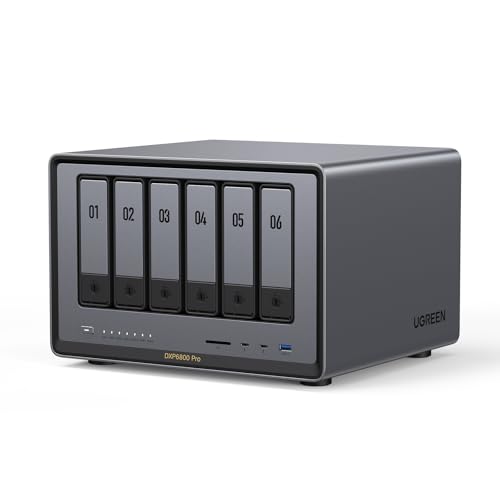 UGREEN NASync DXP6800 Pro 6-Bay Desktop NAS, 2 * 10GbE, 8K HDMI, 2 * TBT4 | Intel i5 1235u 10-Core CPU, 8GB DDR5 RAM, 2 * NVMe Slots, Multi-Device Connectivity, Office Network Nas Storage (Diskless)New · checked | 6 bays · NVMe | £719.99£120.00/bay | £719.99 | Not rechecked yet | Buy on Amazon |
| UGREEN NASync DXP6800 Pro 6 Bay NAS - 128GB, 6x3.5" HDD, 2.5GB/s Read, 2GB/s WriteNew · checked | 6 bays · USB | £1,701.14£13,290.16/TB | £1,701.14 | Not rechecked yet | Buy on Amazon |
| UGREEN NASync DXP6800 Pro 6-Bay Desktop NAS, Intel i5 1235u 10-Core CPU, 8GB DDR5 RAM, 128G SSD, 2 * 10GbE, 2 * M.2 NVMe Slots, 8K HDMI, 2 * TBT4, Network Attached Storage (Diskless) (DXP6800 Pro)Used · checked | 6 bays · NVMe | £845.80£140.97/bay | £845.80 | Not rechecked yet | Buy on Amazon |
The listing’s condition and last check are shown on each row. Prices and availability may change at checkout.
Is it really a deal?
No recently checked listing has reached our recorded low. We compare the same Amazon listing and condition against earlier prices we recorded. Near our low means within 3% of that low. An Amazon reference price shows the retailer’s comparison figure. Check the retailer for any current promotion or access requirements.
Start with the storage plan, not just the chassis
A six-bay NAS only becomes good value when you know how you will use the bays. If you plan to start with two or four disks and add more later, the DXP6800 Pro gives you that headroom. If you already know you only need two drives in mirrored mode, a smaller model such as the DXP2800 may cost less overall and take up less space. If your media library, backups or photo archive are likely to grow quickly, the six-bay layout can be easier to live with than upgrading to a new unit later.
The key tradeoff is that every extra bay is only useful if you can afford the disks to fill it. A six-bay chassis can be attractive on paper, but the total spend is the chassis plus the storage media. For many buyers, the jump from a four-bay to a six-bay model is only sensible if the extra two drives are part of the plan from day one or if replacing the NAS later would be more expensive than buying the larger unit now.
Compare the Pro against the Ultra configuration
UGREEN also sells an Ultra version in the same broad family, so it is worth comparing the DXP6800 Pro with the DXP6800 Ultra rather than treating the Pro as the default choice. The right one depends on what you value most. If the Ultra adds features you will not use, such as a different networking setup, additional connectivity or a revised internal layout, it may not justify the extra spend. If the Pro already gives you the ports, bays and file-sharing functions you need, the simpler choice can be the better buy.
When comparing the two, check the official specification tables for the processor family, memory support, drive interface, M.2 support, USB ports and Ethernet speed. Do not rely on the model name alone, because two closely related NAS units can look similar while differing in the details that matter most to your setup. For example, one version may be better for multi-user office backups, while the other is more appealing for a home media library or lighter shared storage use.
Think about RAID as a storage strategy, not a sales feature
A six-bay chassis gives you more RAID options, but RAID is not a substitute for backup. It can improve resilience or usable capacity depending on the layout you choose, yet the outcome changes with drive sizes and how many disks you populate. If you want redundancy, common approaches include mirrored pairs or parity-based arrays. The tradeoff is simple: more redundancy usually means less usable capacity from the same set of drives.
For someone building a first NAS, it can help to choose a drive plan before choosing the RAID layout. Mixed drive sizes can limit efficiency, and adding one large disk to a set of smaller ones may not unlock all its capacity. If you expect to expand gradually, it is sensible to verify whether the NAS supports the RAID migration or expansion approach you want, then confirm the manufacturer’s instructions for the exact model. That way you avoid buying a six-bay unit that does not match the way you intend to grow storage over time.
Check interfaces and compatibility before you pay for headroom
The most useful specification checks are the boring ones. Confirm whether the DXP6800 Pro accepts 3.5-inch SATA hard drives, 2.5-inch SSDs, or both in the bays, and whether the M.2 slots are for cache, storage, or both. Also check the Ethernet speed. A six-bay NAS with faster networking can make more sense for shared editing, backups from multiple machines or large file transfers than a slower unit, but only if your router, switch and cabling can support it.
If your home network is still mostly gigabit, a high-spec NAS may not feel much faster for everyday use. In that case, the extra money may be better spent on larger or better-quality disks instead of a pricier enclosure. Equally, if you mainly want simple file storage for a small household, a model like the DXP4800 Plus or DXP4800 Pro may be enough, while the DXP4800 GT or DXP480T Plus may be better when the internal layout or performance profile fits your needs more closely. Always verify the exact port mix on the listing and manufacturer page, because accessories and regional variants can differ.
When a smaller or different UGREEN model is the smarter buy
The DXP6800 Pro is not automatically the best value in the range. If you only need a few drives and want lower entry cost, the DXP2800 is the obvious alternative. If you want more flexibility but do not need six bays, the DXP4800 Plus or DXP4800 Pro may strike a better balance between price and storage growth. If you are comparing against the DXP4800 GT or DXP480T Plus, focus on whether their feature mix matches your actual workload rather than the badge on the front.
If your only goal is basic central storage and backup, a smaller NAS can leave more budget for disks, which often matters more than a premium case. If, however, you know you will fill several bays and want room for future expansion, the six-bay Pro may be the better long-term purchase. In short, buy the chassis that matches your storage roadmap, not the one with the biggest spec sheet.
Frequently asked questions
Is the DXP6800 Pro better value than a four-bay NAS?
Only if you expect to use the extra bays. A four-bay model can be cheaper overall once you include disks, so it is often better for smaller households or lighter backup needs. The six-bay Pro is more sensible when you want growth room or plan to populate more drives from the start.
Should I choose the Pro or the Ultra?
Compare the exact specifications, not just the name. Check bays, networking, M.2 support, ports and memory support on the manufacturer page and live listing. Choose the one that matches your network and storage plan, then ignore features you are unlikely to use.
What should I verify before buying any NAS drive setup?
Confirm drive type support, bay count, networking speed, expansion options and RAID compatibility. Also check whether your intended drives are on the manufacturer’s compatibility list, especially if you plan to use large-capacity HDDs or SSDs.
When is a smaller UGREEN NAS the better choice?
If you only need simple file sharing, backups or a mirrored two-disk setup, a smaller model like the DXP2800 may be better value. You pay less upfront and can spend more of the budget on the disks, which often determines the usable storage more than the enclosure does.