Black Friday 2026
5-Bay DAS Black Friday Deals UK 2026
Prices checked
Amazon UK’s 2026 Black Friday sale runs from 19 to 30 November. Black Friday is 27 November. Prices below come from the latest available listing checks.
As an Amazon Associate we earn from qualifying purchases. Prices and availability come from Amazon.co.uk as of the last update and may change.
A 5-bay DAS makes sense when you want a desktop archive with more room to grow than a 4-bay unit, but without jumping straight to a NAS or a rack system. The main trade-off is simple: five bays can give you more flexibility with mixed disk sizes, RAID choices and future expansion, while a smaller enclosure with larger drives can sometimes cost less upfront and take up less desk space. Before buying, check the drive type, interface, maximum capacity support, cooling, power delivery and how the enclosure handles RAID or single-disk mode. The best choice is usually the one that matches your real storage plan, not just the biggest bay count.
Matching Amazon UK listings


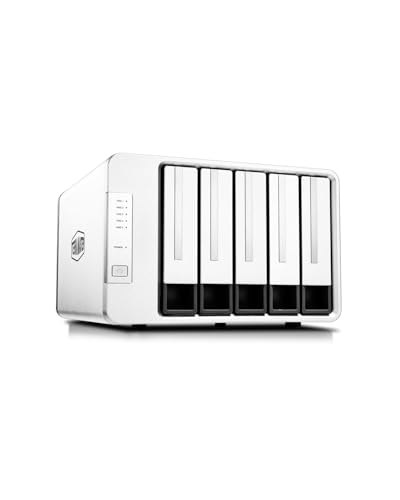

The listing’s condition and last check are shown on each row. Prices and availability may change at checkout.
Is it really a deal?
No recently checked listing has reached our recorded low. We compare the same Amazon listing and condition against earlier prices we recorded. Near our low means within 3% of that low. An Amazon reference price shows the retailer’s comparison figure. Check the retailer for any current promotion or access requirements.
Start with your storage goal, not the bay count
A 5-bay chassis is most useful if you expect your archive to grow in stages. For example, you might start with three drives for photos, video projects or backups, then add two more later as your library expands. That can be more practical than buying a 2-bay or 4-bay box and replacing disks sooner than planned. If you already know your final capacity target, compare the total cost of a 5-bay enclosure plus mid-size drives against a smaller enclosure plus larger-capacity disks. In some cases, fewer bays with larger drives is cheaper and simpler.
If your archive is mostly write-once and read-occasionally, a 5-bay DAS can be a tidy desktop solution. If you only need a mirror for a laptop or one workstation, a 2-bay or 4-bay unit may be enough. Pick the layout that fits the amount of data you expect to keep for several years, not just this month.
Check how the enclosure connects and what your computer can support
The interface matters because it sets the practical speed and compatibility of the box. Confirm whether the DAS uses USB-C, USB 3.x, Thunderbolt or another connection, and match that to the ports on your PC or Mac. A fast enclosure is less useful if your computer only has an older port, or if you need to buy an adapter that limits performance. Also check whether the unit includes a cable and whether the host connection is bus-powered or needs an external supply.
For desktop archive use, stability is often more important than peak speed. If you are moving large video files or disk images, you may benefit from a faster interface. If you mainly store older documents, photos and backups, reliability and ease of use may matter more than headline transfer rates. Always verify the supported operating systems and whether any RAID software is required on the host machine.
Choose the right disk strategy before you buy the chassis
A 5-bay enclosure gives you room to mix capacity and redundancy, but it does not remove the need to plan the drive set. Read the manufacturer’s specification for supported drive sizes, sector formats if listed, and whether the bays accept 2.5-inch, 3.5-inch or both. Then check the maximum per-bay and total capacity the enclosure claims to support, because that affects upgrade headroom.
There are two common approaches. One is to fill the enclosure with smaller disks and use RAID for fault tolerance. The other is to use fewer, larger disks in a simpler layout and expand later. The first approach can be neat if you want redundancy from day one. The second can be better if you care more about price per terabyte and do not want the overhead of managing a more complex RAID set. If you are unsure, remember that RAID is not a substitute for backup. A DAS can protect against some drive failure scenarios, but it does not replace copies stored elsewhere.
Compare 5-bay to 4-bay units and to a NAS before deciding
A 4-bay DAS is often the better value if your archive will stay modest and you prefer a smaller footprint. It can be easier to place on a desk, easier to cool and simpler to populate. The 5-bay option earns its place when you need that extra slot to avoid a disruptive upgrade, or when the RAID choice you want works better with five drives than four.
If you are tempted by a NAS instead, ask whether you actually need network access, user accounts, remote sharing or always-on services. A NAS is usually better when multiple devices or people need access across a network. A DAS is often better when one computer does the heavy lifting and you want a direct, simple storage box. For a single desktop archive, a DAS often avoids the added software, admin and cost of a full network appliance.
When closely related alternatives make more sense
A model such as the QNAP TR-004 is worth considering if you want a familiar multi-bay desktop enclosure with a known ecosystem and you like the idea of linking it to a host that handles the management. It is best compared on the basis of supported drive types, RAID modes, host interface and whether the software suits your workflow. A TerraMaster D4-320, by contrast, may suit buyers who do not need the fifth bay and prefer a simpler 4-bay chassis with potentially lower cost and a smaller footprint.
If your archive is unlikely to outgrow four drives, a 4-bay DAS can be the cleaner purchase. If you know you will need more headroom and do not want to replace a box later, a 5-bay unit is the more future-proof buy. The right call depends on how soon you expect to add disks, whether your desk space is limited and how important it is to keep spare room for growth.
Frequently asked questions
Is a 5-bay DAS better than buying larger disks for a smaller enclosure?
Not always. Larger disks in a 2-bay or 4-bay unit can be cheaper, simpler and smaller. A 5-bay DAS is better when you want more growth room, more layout flexibility or a RAID arrangement that benefits from extra bays.
Do I need RAID in a desktop archive DAS?
Only if it matches your goal. RAID can help with uptime or redundancy, but it is not a backup. For a simple archive, some buyers prefer single-disk volumes plus separate backups because it is easier to understand and rebuild.
What specs should I verify on the product page?
Check the drive size support, host interface, power method, cooling details, RAID or non-RAID modes, operating system support and maximum capacity claims. Then confirm those points on the manufacturer’s own specification page.
When should I choose a NAS instead of a DAS?
Choose a NAS if you need network sharing, remote access or multiple users and devices accessing the same storage. Choose a DAS if one desktop or laptop is the main user and you want a direct, simpler storage expansion.