Black Friday 2026
1TB SSD Black Friday Deals UK 2026
Prices checked
Amazon UK’s 2026 Black Friday sale runs from 19 to 30 November. Black Friday is 27 November. Prices below come from the latest available listing checks.
As an Amazon Associate we earn from qualifying purchases. Prices and availability come from Amazon.co.uk as of the last update and may change.
A 1TB SSD is often the sensible middle ground when you want fast local storage without paying for a larger drive you may not fill. For many buyers it works best as a boot drive, a small scratch disk for active projects, or a portable backup target in an external enclosure. Before comparing prices, decide which of those jobs matters most, because the right choice depends as much on interface, form factor and endurance class as on headline capacity. Check the manufacturer’s spec sheet and the product listing for the exact connector, physical size, supported protocol and any heat-sink requirements, then compare that with your laptop, desktop or enclosure.
Matching Amazon UK listings


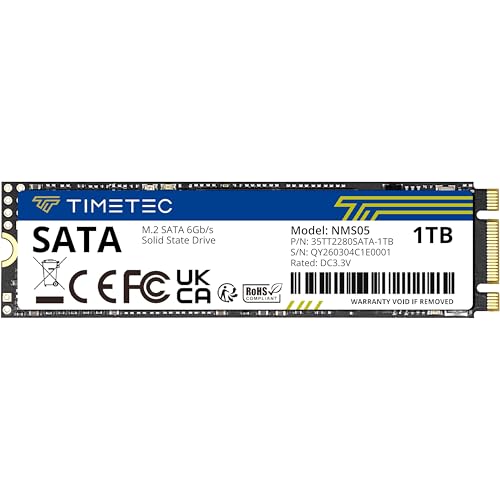


The listing’s condition and last check are shown on each row. Prices and availability may change at checkout.
Is it really a deal?
18 listings are at or near our recorded low. We compare the same Amazon listing and condition against earlier prices we recorded. Near our low means within 3% of that low. An Amazon reference price shows the retailer’s comparison figure. Check the retailer for any current promotion or access requirements.
Start with the job, not the price
If the SSD will hold Windows, macOS or Linux plus a few core apps, 1TB is usually enough for a tidy system drive. It leaves space for updates, browser caches and a working folder without forcing you into immediate cleanup. If you edit photos, maintain a small game library, or keep a scratch disk for temporary files, 1TB can still make sense, but only if your workflow regularly moves finished work elsewhere.
As a portable backup drive, 1TB is useful for cloning a single machine or carrying a limited archive, but it is not ideal for long-term reliance if your data footprint is growing. In that case, a 2TB SSD may be the better sibling choice because the cost-per-GB is often better and you will not outgrow it as quickly. By contrast, if you only need a very small boot drive for an older system or a thin client, even 1TB may be more than you need, and a smaller SSD could be better value.
Match the interface to the device you already own
The most important check is whether the SSD is SATA or NVMe, and whether your device supports it. A 2.5-inch SATA SSD uses a cable and a SATA bay, while an M.2 SSD plugs into a motherboard slot or compatible enclosure. M.2 is a physical form factor, not a speed guarantee. An M.2 drive may still be SATA or NVMe, so the listing should say both the size and the protocol.
For a boot drive, confirm that your motherboard or laptop supports booting from that interface. For a small scratch disk, make sure the slot has the lane support and thermal clearance the drive expects. For portable use, an NVMe drive in a USB enclosure can be convenient, but the enclosure must support the right length and protocol. If your system only supports SATA, a fast NVMe model is not the best buy because you would not benefit from its interface. In that case, a good SATA SSD is the more practical alternative.
Compare endurance and controller class for the workload
A 1TB SSD used for a boot drive or light creative work does not need enterprise-grade endurance, but it should still match the amount of writing you expect. Check the manufacturer’s TBW or DWPD figure, if provided, and look for whether the drive uses TLC or QLC NAND. TLC is usually the safer all-round choice for mixed use, while QLC can be fine for read-heavy storage or backups if the lower write endurance suits your pattern.
If you will copy large files often, use the drive as a scratch disk, or keep it in a portable enclosure, pay more attention to sustained write behaviour than to peak benchmark claims. Some consumer drives slow down once their cache is full, which matters if you regularly move big video folders or camera dumps. For that reason, a model like the Kingston KC3000 or Lexar NM1090 Pro may be worth comparing against other NVMe siblings only if your system supports the interface and your workload benefits from it. If your needs are modest, a more mainstream option such as the Lexar NM790 may be easier to justify on cost. Always verify the exact controller, NAND type and capacity-specific specs on the manufacturer page, because these can vary by revision or model family.
Think about heat, enclosure choice and real portability
Portable SSD use sounds simple, but enclosure and thermal management matter. A bare M.2 drive placed in a USB case needs an enclosure that supports the drive length, protocol and transfer mode you want. Some enclosures are limited by USB 3.2 Gen 2, while others support faster links, but the enclosure and host device must both support that standard. If you are buying for travel, a compact SATA SSD in a basic USB enclosure can be a perfectly sensible alternative because it may run cooler and cost less than a high-end NVMe setup.
For desktop use, a heatsink can be helpful, but only if your motherboard case layout leaves room for it. Some boards already have M.2 shields or thermal pads; others do not. Check the listing carefully so you do not buy a drive with a pre-fitted heatsink that will not fit under your graphics card or laptop cover. If you are unsure, the safer choice is a standard non-heatsink model and, if needed, add cooling through the enclosure or motherboard accessory supplied by the device maker.
When a different capacity is the better fit
A 2TB SSD is usually the more balanced option if you want one drive for system files, games and active projects. It gives more breathing room and can delay the point at which you need a second drive. A 3.84TB SSD or 7.68TB SSD only makes sense when you already know you will use most of that space, because those capacities are aimed at much heavier storage needs and should be compared on total cost and interface fit, not simply on being larger.
If you are comparing premium models such as the Corsair MP700 Pro, check whether your platform can actually use the faster interface and whether your use case justifies it. For most buyers, the best value comes from matching the drive to the task, not from buying the fastest product available. If you need a simple boot drive or portable backup, smaller and less ambitious may be the smarter route.
Frequently asked questions
Is 1TB enough for a boot drive?
Often yes, especially for one operating system and everyday apps. It is a comfortable size if you keep large media files on a second drive or in cloud storage.
Should I choose SATA or NVMe?
Choose the type your device supports. NVMe is usually better for newer systems and heavier workloads, while SATA is often the sensible option for older laptops, budget desktops and many simple upgrades.
Can I use a 1TB SSD as a portable drive?
Yes, if you pair it with the right external enclosure. Just check the drive size, protocol and enclosure speed before buying.
When should I step up to 2TB instead?
Choose 2TB if you want more room for games, creative projects or backups and do not want to manage space tightly. It is often the better long-term buy for mixed use.