Black Friday 2026
7.68TB SSD Black Friday Deals UK 2026
Prices checked
Amazon UK’s 2026 Black Friday sale runs from 19 to 30 November. Black Friday is 27 November. Prices below come from the latest available listing checks.
As an Amazon Associate we earn from qualifying purchases. Prices and availability come from Amazon.co.uk as of the last update and may change.
A 7.68TB SSD is usually bought for density first and speed second. The main questions are not just how much it stores, but whether it fits your server or NAS bay, whether the endurance rating matches your write pattern, and whether you can afford a second, verified spare. For many buyers, a smaller consumer SSD or a 3.84TB enterprise drive will be the better value if the workload is lighter or the enclosure is less demanding. The right choice depends on interface, form factor, power loss protection, and whether the device will live in a server backplane or a standard PC slot.
Matching Amazon UK listings
| Product | Details | Price | Recorded low | Price verdict | |
|---|---|---|---|---|---|
 Origin Storage 7680GB Hot Plug Enterprise SSD 2.5in SATA Mixed Work Load W/CaNew · checked | 7.68 TB · SATA | £4,622.28£601.86/TB | £4,459.10 | Above our low | Buy on Amazon |
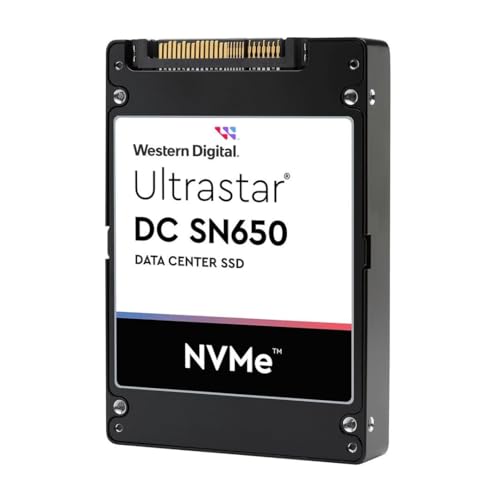 Western Digital WD 2.5 Inch SSD Ultrastar SN650 7.68TB (PCIe 4.0/NVMe) (Di)New · checked | 7.68 TB · NVMe | £6,228.20£810.96/TB | £5,477.06 | Above our low | Buy on Amazon |
 Hewlett Packard Enterprise P40501-B21 2.5 Inch 7680GB SATA TLC Solid State DriveNew · checked | 7.68 TB · SATA | £4,867.55£633.80/TB | £4,867.55 | Not rechecked yet | Buy on Amazon |
 Origin Storage 7680GB Hot Plug Enterprise SSD 2.5in SATA Read IntensiveNew · checked | 7.68 TB · SATA | £5,013.38£652.78/TB | £5,013.38 | Not rechecked yet | Buy on Amazon |
The listing’s condition and last check are shown on each row. Prices and availability may change at checkout.
Is it really a deal?
No recently checked listing has reached our recorded low. We compare the same Amazon listing and condition against earlier prices we recorded. Near our low means within 3% of that low. An Amazon reference price shows the retailer’s comparison figure. Check the retailer for any current promotion or access requirements.
Check the backplane before you look at the label
The first compatibility check is physical and electrical, not capacity. A 7.68TB SSD may be SATA, U.2/U.3 NVMe, E1.S, E3.S, or another enterprise format, and each one needs the right bay, connector, caddy, and sometimes a specific backplane. A drive that looks suitable on paper can be unusable in a NAS or server if the chassis only accepts 2.5-inch SATA or if the backplane is wired for SAS rather than NVMe. When you compare listings, verify the exact interface, form factor, and whether the drive is intended for hot-swap use.
paragraphsIf you are using a server with a shared backplane, also check lane mapping and controller support. Some systems accept U.2 drives but only on certain ports or with the correct riser, cable, or HBA. Others need bifurcation settings enabled in firmware. Do not assume that a PCIe-based SSD will work simply because it is the same physical size as a SATA drive. The manufacturer specification page and the server or NAS compatibility list are the two sources that matter most here.
Endurance should match the job, not the number on the box
For a high-capacity SSD, endurance matters because the drive is often bought to absorb heavy writes, not just to hold archives. Check the TBW or DWPD figure in the manufacturer spec sheet and compare it with your actual use. A media library, VM datastore, log volume, or write cache can put very different stress on the drive. If your workload is mostly reads, a lower-endurance model may still be fine. If you expect constant database writes, frequent snapshots, or large temporary files, look for an enterprise class device with a higher endurance rating and, where relevant, power loss protection.
paragraphsThe useful comparison is not only between brands, but between capacities. Larger SSDs often have better write endurance than smaller versions in the same family, but that does not mean every 7.68TB model is suitable for every server role. Read the manufacturer’s rated workload assumptions, temperature limits, and any note about mixed-use or read-intensive positioning. If the listing omits these details, treat that as a prompt to confirm them elsewhere rather than as proof that they do not matter.
Budget for a verified spare, not just the primary drive
With enterprise storage, the cost of ownership is usually higher than the headline price because the spare matters. If a 7.68TB SSD sits in a RAID set, mirror, or mirrored cache pool, a replacement drive should be the same interface, same capacity class, and ideally the same family so that rebuild behaviour is predictable. A cheap generic substitute can complicate recovery or be rejected by the controller if the interface, sector size, or firmware behaviour differs. It is sensible to plan for one verified spare if the data is important or if replacement lead times would be painful.
paragraphsA verified spare does not mean a random similar model. It means a drive you have already checked for fit, detected correctly in the system, and confirmed as compatible with your array or enclosure. If you cannot justify that cost, consider whether a smaller capacity SSD, such as 3.84TB, would cover your current need with less cash tied up in redundancy. For some buyers, two smaller matched drives are more practical than one large drive plus an uncertain future replacement.
When a smaller SSD or a different class makes better sense
A 7.68TB SSD is often overkill for desktop acceleration, light NAS use, or a single game library. If the goal is general PC storage, a 1TB or 2TB SSD can be enough and may offer a better balance of price, availability, and interface simplicity. Those models also tend to be easier to fit into standard motherboards and external enclosures. If you only need fast scratch space or a boot drive, there is no reason to pay for enterprise density you will not use.
paragraphsA 3.84TB SSD is the closest practical alternative when you want enterprise features but do not need the full capacity. It may reduce both initial spend and the cost of a spare. By contrast, consumer models such as the Corsair MP700 Pro, Kingston KC3000, Lexar NM1090 Pro, or Lexar NM790 are better thought of as high-speed PC SSDs rather than server parts. They can be excellent for a workstation or gaming rig, but you should confirm whether they offer the interface, endurance characteristics, temperature tolerance, and power-loss behaviour your server environment expects. If your priority is enterprise compatibility, a Micron Enterprise SSD is the more relevant comparison class.
How to verify the listing before you buy
Use the listing to confirm the exact model number, interface, capacity, and whether it is new, refurbished, or sold as bulk/OEM stock. Then cross-check the part number on the manufacturer page. Look for the endurance rating, sector format, supported features such as encryption or power loss protection, operating temperature, and any notes on host compatibility. If the seller summary is vague, rely on the manufacturer documentation rather than assumptions from the title.
paragraphsIt also helps to check your system manuals for supported drive types, maximum height or thickness, and any requirement for carrier trays or firmware updates. If you are buying for a NAS, make sure the device supports the relevant drive type and that the controller can handle the interface without adapters. For a server, confirm there is a clear path to replace the drive later, because the best SSD is only useful if you can keep the array serviceable over time.
Frequently asked questions
Is a 7.68TB SSD always the best choice for a NAS or server?
No. It is best when you need high density in a compatible bay and the workload justifies enterprise endurance. For lighter use, 1TB, 2TB, or 3.84TB may be more sensible and easier to replace.
What matters most for compatibility?
The exact interface, form factor, and backplane support. Check whether the drive is SATA, NVMe, or another enterprise format, then confirm your chassis, controller, and cabling support it.
Should I buy a spare at the same time?
If the drive is critical, yes. A verified spare avoids delays and reduces the risk of mismatch during recovery. If you cannot afford that, reconsider whether a smaller capacity would be a better fit.
How do I check endurance properly?
Look for TBW or DWPD on the manufacturer spec sheet and compare it with your write pattern. If that information is missing from the listing, verify it before buying.