Black Friday 2026
ASUSTOR AS5402T Black Friday Deals UK 2026
Prices checked
Amazon UK’s 2026 Black Friday sale runs from 19 to 30 November. Black Friday is 27 November. Prices below come from the latest available listing checks.
As an Amazon Associate we earn from qualifying purchases. Prices and availability come from Amazon.co.uk as of the last update and may change.
The ASUSTOR AS5402T makes sense if you want a compact NAS now, but the real decision is whether a two-disk layout will still suit you once storage, app use and upgrade costs are added up. A 2-bay unit can be the most economical starting point for backups, media and file sharing, yet it can become expensive if you expect to expand capacity later through bigger drives, more memory or extra flash. Treat it as a “buy once, plan carefully” choice: confirm the bay count, supported drive types, memory options and expansion paths on the manufacturer page and the live listing before you commit.
Matching Amazon UK listings
| Product | Details | Price | Recorded low | Price verdict | |
|---|---|---|---|---|---|
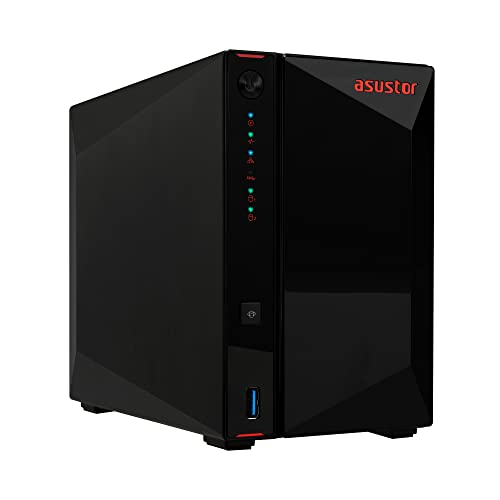 Asustor AS5402T 2 Bay NAS Storage for Content Creators & Video Editors | Quad-Core CPU, 4xM.2 NVMe SSD Slots, 2x2.5GbE Ports, 4GB DDR4 RAM, Gaming Network Attached Storage, Personal Cloud (Diskless)New · checked | 2 bays · NVMe | £332.00£166.00/bay | £311.57 | RRP discount onlyAmazon reference price £369.00 | Buy on Amazon |
The listing’s condition and last check are shown on each row. Prices and availability may change at checkout.
Is it really a deal?
No recently checked listing has reached our recorded low. We compare the same Amazon listing and condition against earlier prices we recorded. Near our low means within 3% of that low. An Amazon reference price shows the retailer’s comparison figure. Check the retailer for any current promotion or access requirements.
1. Start with what a 2-bay NAS is best at
A two-bay NAS is usually the simplest route if you mainly need central storage for a home office, family backups or a modest media library. It keeps the footprint small, uses fewer drives to begin with and is easier to set up than larger models. If your main goal is to replace a USB hard drive or keep shared files online at home, the AS5402T’s compact format is a sensible place to start.
The tradeoff is capacity planning. With only two drive bays, your choices are narrower once the disks are installed. You can mirror the drives for redundancy or use the full combined capacity, but either way you have limited room for future growth. If you expect your data to keep rising, check how large the highest supported drives are according to ASUSTOR’s documentation, then compare that with the cost of buying those drives later rather than paying for extra bays now.
2. Think beyond the chassis: memory, flash and interfaces
The headline price of a NAS rarely tells the full story. If you plan to run several apps, indexes, photo libraries or container tools, you may also need more memory or flash storage. Before buying the AS5402T, confirm from the manufacturer and the product listing whether memory is user-upgradable, what the maximum supported capacity is, and whether any flash slots or cache options are available. Do not assume an upgrade path from a similar model; verify the exact revision.
Interfaces matter too. Check the network ports, USB options and any M.2 or cache support directly in the specification sheet. If your network is still standard gigabit, a faster NAS may be limited by the rest of your setup. If the listing includes multi-gig Ethernet, make sure your switch, router or direct connection can actually use it. The same applies to storage: SATA drive support, SSD compatibility and any NVMe features should all be confirmed model by model, not inferred from the brand name.
3. When a 4-bay model is better value
A 4-bay NAS such as the AS5404T is often the better buy when you know your library will grow, or when you want more flexibility over RAID layouts. More bays do not automatically mean better performance, but they do give you more ways to balance usable capacity and redundancy. For example, four smaller drives can sometimes be easier to scale and replace than two very large ones, especially if you prefer to add storage gradually.
The cost tradeoff is not just the extra enclosure. Four bays usually mean extra drive purchase cost up front, and that can be substantial. However, if you will otherwise need to replace two drives with much larger ones later, the larger chassis can be the cheaper long-term route. If your use case is home backup, photo archive or multi-user file sharing, compare the total cost of ownership, not just the device price. If you know two bays will be enough for the life of the unit, the smaller model is easier to justify.
4. Where the other ASUSTOR options fit
Choose the AS1204T if your needs are basic and you want a lower-cost entry point, especially for light backup or simple file sharing. It is the sensible alternative when the AS5402T feels more capable than you need and you would rather put more of the budget into drives.
Step up to the AS6702T or AS6704T if you want a more expandable platform and expect heavier app use, a busier household or a larger media archive. The two-bay version keeps the footprint smaller, while the four-bay version gives more room to grow. If your priorities are dense flash storage rather than spinning disks, the Flashstor 12 Pro Gen2 or FS6806X family may be worth comparing instead, but only if you have verified that flash-only storage suits your workload, budget and backup plan. In many homes, a traditional NAS with hard drives is still the more practical and cost-conscious choice.
5. Buy for the storage plan, not the spec sheet alone
Before you order, make a short checklist. Confirm the exact model name, the number of drive bays, supported drive sizes, memory limits, any expansion or cache features, and the network ports. Check whether the listing includes the unit only or any accessories you might otherwise need. Then estimate your real storage need over the next two or three years, not just today’s folder size.
A useful rule is to buy the smallest NAS that still leaves headroom for your likely growth. If you are unsure, a 4-bay model can be safer because it gives you more flexibility with RAID and future expansion. If you are confident that two drives will cover your use case, the AS5402T is the neater, simpler option. If neither feels right, it may be that a DAS enclosure, a smaller 2-bay NAS, or a larger 4-bay system is the better fit.
Frequently asked questions
Is a 2-bay NAS enough for home use?
Yes, if you mainly want shared storage, backups or light media use. It becomes less attractive if you expect rapid growth or want more flexible RAID choices later.
Should I buy more bays now or add larger drives later?
If future growth is likely, extra bays often give you more flexibility. If your storage needs are stable, a 2-bay unit can be the cheaper and simpler choice.
What should I verify on the AS5402T listing?
Check the exact model, bay count, supported drive types and sizes, memory upgrade options, network interfaces and any cache or expansion support shown in the manufacturer spec sheet and seller listing.
When is DAS a better choice than a NAS?
Choose DAS if you only need direct-attached storage for one computer and do not need network sharing, remote access or app hosting. It is often simpler and cheaper than a NAS.