Black Friday 2026
ASUSTOR AS6704T Black Friday Deals UK 2026
Prices checked
Amazon UK’s 2026 Black Friday sale runs from 19 to 30 November. Black Friday is 27 November. Prices below come from the latest available listing checks.
As an Amazon Associate we earn from qualifying purchases. Prices and availability come from Amazon.co.uk as of the last update and may change.
The ASUSTOR AS6704T only makes sense if you are buying for the long term. It is the sort of NAS to consider when you want more bays than a 2-bay unit, room to add capacity later, and enough network headroom that the rest of your setup will not feel dated too quickly. Before you decide, check the exact generation on the manufacturer page, confirm the drive type and maximum supported capacities in the listing, and total the full cost of the NAS plus disks and any network upgrade you may need. That full system cost usually matters more than the headline price of the enclosure alone.
Matching Amazon UK listings
| Product | Details | Price | Recorded low | Price verdict | |
|---|---|---|---|---|---|
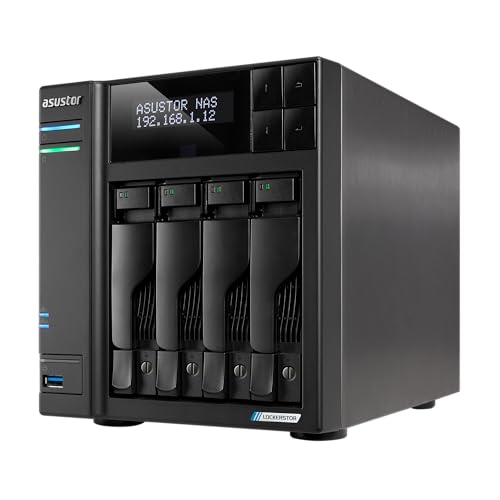 Asustor Lockerstor 4 Gen2+ AS6704T v2 4 Bay NAS for Content Creators | Dual 5GbE Ports, 4GB DDR4, 4 M.2 SSD Slots, HDMI, Plex Media Server, Video Editing, Network Attached Storage (Diskless)New · checked | 4 bays · USB | £643.00£160.75/bay | £643.00 | Real low | Buy on Amazon |
 Asustor Lockerstor 4 Gen 2 AS6704T | 4 Bay NAS, Quad Core 2.0GHz CPU, 4 M.2 PCIe 3.0 SSD Slots, 2 2.5GbE Ports, 4GB RAM DDR4, Network Attached Storage (Diskless)New · checked | 4 bays · USB | £715.82£178.96/bay | £659.02 | Above our low | Buy on Amazon |
The listing’s condition and last check are shown on each row. Prices and availability may change at checkout.
Is it really a deal?
1 listing is at or near our recorded low. We compare the same Amazon listing and condition against earlier prices we recorded. Near our low means within 3% of that low. An Amazon reference price shows the retailer’s comparison figure. Check the retailer for any current promotion or access requirements.
1) Start with the exact generation, not just the model name
ASUSTOR model names can look similar across generations, so first confirm that the listing is actually for the AS6704T and not a close relative. The safest approach is to cross-check the model code on the retailer page against ASUSTOR’s product page, then verify the CPU family, memory configuration, drive bays, M.2 support if listed, and the rear ports. If a listing is vague, treat it as incomplete until you have matched those details from the manufacturer.
This matters because a newer generation can change more than small cosmetic details. Port layout, expansion options, bundled accessories, and supported features may differ from an older or smaller unit with a similar name. If you are comparing against the AS6702T, for example, the main question is whether you actually need four bays rather than two. If you do not, the smaller model can save money and still meet your storage needs. If you expect your library, backups, or project files to grow, the extra bays on the AS6704T are often the reason to buy it in the first place.
2) Work out the drive plan before you buy the enclosure
The enclosure price is only one part of the spend. A four-bay NAS becomes expensive once you add drives, especially if you want all bays populated from day one. Check the listing and manufacturer documentation for supported drive types, maximum capacity per bay, and whether the unit is intended for HDDs, SSDs, or a mix. Do not assume all 3.5-inch or 2.5-inch drives will suit every NAS without checking.
Think about how you want to build storage. Two larger drives in a mirrored setup may be enough for a home media library, while four smaller drives can give a more flexible balance of usable capacity and redundancy. If you plan to start with two drives and add more later, a four-bay NAS is usually better than a 2-bay unit because it gives you room to expand without replacing the whole system. The trade-off is upfront cost: buying the extra bays now can cost more even if you do not fill them immediately. For buyers who will only ever use two disks, the ASUSTOR AS5402T or another 2-bay NAS may be a better match.
3) Check network upgrades, because storage speed is often limited elsewhere
Network capability is one of the biggest reasons to compare the AS6704T with cheaper alternatives. If your home network is still standard gigabit and you are mostly backing up photos, documents, and media, the NAS may work fine without any special upgrade. But if you want faster transfers for large video files, shared editing, or multiple users, confirm whether the NAS and your switch, router, or PC can actually use faster networking.
Look for the exact Ethernet specification in the product page and the manual, then check what your other devices support. A NAS with faster ports is only useful if the rest of the path can match them, or if you plan to add a compatible switch or adapter. That is why it is sensible to compare the AS6704T with the ASUSTOR AS5404T or ASUSTOR AS5402T. If you do not need more than basic network throughput, a lower-cost NAS may be the smarter buy. If you do expect to upgrade the network later, the AS6704T can be a better base unit, provided the rest of your setup is ready or upgradeable.
4) RAID, backups and the real cost of choosing four bays
A four-bay NAS gives you more RAID options, but RAID is not a substitute for backup. Decide first whether your priority is usable capacity, redundancy, or a mixture of both. For example, a mirrored configuration is simpler to manage, while a parity-based setup can use capacity more efficiently once you have more drives installed. Your choice affects how much storage you actually get from the disks you buy, so it should be part of the budget from the start.
The right question is not simply whether the AS6704T has more bays, but whether those bays match the way you store data. If you only need a reliable backup target for one or two computers, a 2-bay NAS may be enough. If you expect growth, shared access, or separate pools for media, backups and working files, a 4-bay NAS is more practical. The AS6704T is best seen as a capacity and flexibility play, not a bargain enclosure. Add up the enclosure, the initial drives, and any network hardware you may need before deciding. That total often explains whether it is good value for you.
5) When a different ASUSTOR option makes more sense
Choose the ASUSTOR AS1204T only if your needs are modest and you want a simpler, lower-cost entry point. It is the kind of alternative to consider when capacity growth is not a priority. The ASUSTOR AS5402T is the better comparison if you want a newer 2-bay model and are trying to decide whether you really need four disks. The ASUSTOR AS5404T makes more sense if you want a 4-bay layout but do not need the same exact positioning as the AS6704T.
The Flashstor 12 Pro Gen2 and FS6806X are different propositions again. They are worth checking only if your use case is driven by higher-end flash storage or a more specialised design, rather than standard mixed hard-drive NAS storage. In practice, most shoppers looking at the AS6704T are choosing between a fuller four-bay expansion path and a cheaper 2-bay setup. If that is your situation, focus on the total system cost and the network you already own.
Frequently asked questions
How do I confirm I am looking at the right ASUSTOR model?
Match the exact model code on the retailer listing with ASUSTOR’s product page, then verify the drive bays, network ports, memory, and any expansion features from the manufacturer documentation.
Is a 4-bay NAS always better than a 2-bay NAS?
No. A 4-bay NAS is better if you expect to grow, want more RAID choices, or need more flexibility. A 2-bay NAS can be better if you want lower upfront cost and know your capacity needs will stay modest.
Should I buy faster network gear with this NAS?
Only if your usage can benefit from it. Faster ports help most when your switches, router, and client devices can also support the upgrade, or when you plan to replace them over time.
Do I need to fill all four bays straight away?
No. Many buyers start with fewer drives and expand later. Just confirm the recommended expansion path, supported drive sizes, and how your chosen RAID or storage pool will grow before you buy.