Black Friday 2026
ASUSTOR AS6702T Black Friday Deals UK 2026
Prices checked
Amazon UK’s 2026 Black Friday sale runs from 19 to 30 November. Black Friday is 27 November. Prices below come from the latest available listing checks.
As an Amazon Associate we earn from qualifying purchases. Prices and availability come from Amazon.co.uk as of the last update and may change.
The ASUSTOR AS6702T sits in a compact two-bay class where the details matter more than the headline model name. When shopping, check the exact generation, the memory configuration, and the storage expansion path before comparing listings. A small difference in CPU revision, included RAM, or bundle contents can change how well the unit fits your mix of backups, media, containers or office file sharing. Because this page already shows live listings and price history, the main task is to confirm that the offer you are viewing matches the exact hardware you want, rather than assuming every AS6702T listing is identical.
Matching Amazon UK listings
| Product | Details | Price | Recorded low | Price verdict | |
|---|---|---|---|---|---|
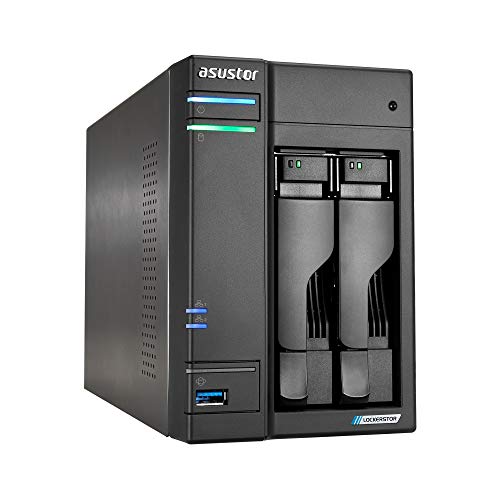 Asustor Lockerstor 2 Gen 2 AS6702T | 2 Bay NAS, Quad Core 2.0GHz CPU, 4 M.2 PCIe 3.0 SSD Slots, 2 2.5GbE Ports, 4GB RAM DDR4, Network Attached Storage (Diskless)New · checked | 2 bays · USB | £375.00£187.50/bay | £375.00 | Real lowAmazon reference price £469.00 | Buy on Amazon |
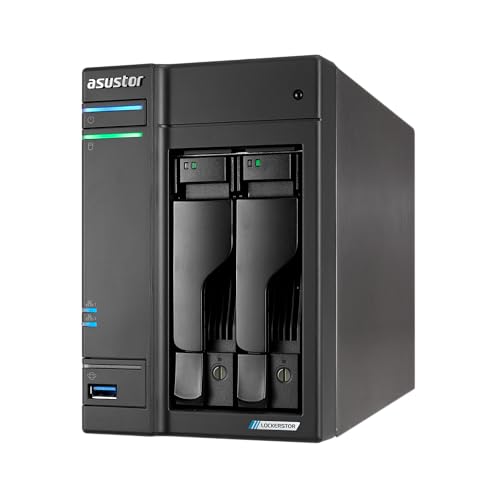 Asustor Lockerstor 2 Gen2+ AS6702T v2 2 Bay NAS Storage for Content Creator | Intel Quad-Core CPU, Dual 5GbE Ports, 4GB DDR4, 4 M.2 SSD Slots, HDMI, Plex Media Server, Network Attached Storage (Diskless)New · checked | 2 bays · USB | £504.00£252.00/bay | £504.00 | Real low | Buy on Amazon |
The listing’s condition and last check are shown on each row. Prices and availability may change at checkout.
Is it really a deal?
2 listings are at or near our recorded low. We compare the same Amazon listing and condition against earlier prices we recorded. Near our low means within 3% of that low. An Amazon reference price shows the retailer’s comparison figure. Check the retailer for any current promotion or access requirements.
Start with the exact model string and generation
The first thing to verify is that the listing matches AS6702T exactly, not a similar ASUSTOR unit from the same family. Retailers sometimes shorten names, omit generation detail, or group multiple variants together. Look for the full model string on the product page, then cross-check it against the manufacturer’s spec page and the product photos. If the listing only says “Lockerstor” or “2-bay NAS” without the full code, treat that as a prompt to investigate rather than a safe match.
The reason this matters is that compact NAS models can change over time while keeping a familiar naming pattern. A buyer searching for a current-generation or specific revision should confirm the release or hardware generation, the CPU family if stated, and any “Gen” wording if ASUSTOR uses it in the wider range. Do not rely on the seller title alone. Check the model number printed on the box, the rear label in photos, and the technical details section. If anything conflicts, use the manufacturer’s documentation as the final reference.
Check the memory configuration before you compare prices
Memory is one of the most important differences between otherwise similar NAS listings. Some offers may ship with a fixed amount of RAM, while others may have an expandable slot or a different factory configuration. You should confirm whether the quoted memory is soldered, installed in a slot, or both, and whether the listing includes the same capacity as the manufacturer’s base spec. If you expect to run multiple services, containers or heavier indexing tasks, the memory configuration can matter as much as the disk bays.
When comparing listings, separate the cost of the NAS itself from the cost of any extra RAM you might need. A lower-priced unit that forces you to upgrade memory immediately may be worse value than a more complete configuration. Read the memory type, maximum supported capacity, and upgrade path in the manufacturer specs, then check whether the seller has changed anything in the bundle. If the listing does not clearly state the installed RAM, assume you need to verify it before buying.
Match the drive bays and expansion plan to your storage life
This model is a compact two-bay NAS, so it suits buyers who value a smaller footprint and simple setup. Two bays are enough for mirrored storage if you want redundancy, but they are less flexible than a four-bay unit when you need more usable capacity or easier future growth. If your library, backups or shared files are likely to expand quickly, compare the AS6702T with the AS6704T or a broader 4-bay NAS category before choosing. The extra bays can reduce the need to replace drives sooner, although they also raise the starting cost and usually take up more space.
If your storage needs are modest, a two-bay model can be the right balance. For example, a home office that mainly stores documents, family photos and a few media folders may prefer the smaller chassis. A small business that expects rapid dataset growth, multiple user accounts or several backup targets may find a four-bay unit easier to live with. Check the supported drive sizes, the drive type compatibility, and any notes about SSD use, because these determine how the enclosure fits your long-term plan.
Think about interface, networking and where NAS beats DAS
A NAS makes sense when you want shared network storage, user permissions and remote access features. A DAS, by contrast, is usually the better choice if you mainly want direct-attached storage for one computer and do not need network sharing. If your use case is a single editor, a local backup drive, or fast transport between one or two machines, a DAS can be simpler and cheaper. If you need central storage for several devices, scheduled backups or always-on access, the NAS route is usually more suitable.
Before buying, verify the network interfaces, the USB ports, and any expansion or imaging options from the manufacturer’s datasheet. Also check whether the listing pictures show the right rear-panel layout, because ports can vary between close variants. If you plan to use the unit with a router, switch or 2.5GbE path, make sure your wider network can support that setup. The right interface only helps if the rest of your network can use it. For some buyers, a smaller NAS with the correct ports is a better fit than a larger model with unused features.
Use the price history to judge value, not just the headline discount
Because the site already shows price history and timestamps, you can compare a live listing against its recent movement instead of reacting to a single sale label. That is especially useful for a model like the AS6702T, where exact configuration matters and bundle changes can confuse headline pricing. Compare like with like: same model code, same memory, same storage-free or bundled state, and same seller type where possible.
If the AS6702T is close in price to a higher-bay alternative, check whether the extra bays are worth the larger case. If it is close to a simpler 2-bay NAS, ask whether you are paying for the right feature set or simply for a brand name. If the listing lacks a clear memory breakdown or generation statement, treat that uncertainty as part of the total cost. Sometimes the best value is not the cheapest listing but the one with the clearest specifications and the least risk of mismatch.
Frequently asked questions
How do I confirm I am looking at the correct AS6702T version?
Match the full model code on the listing, then verify the same code on ASUSTOR’s own spec page. Check the product photos, rear-panel layout and any generation wording. If the seller description is vague or shortened, do not assume it is the exact unit you want.
Is a two-bay NAS enough for this kind of buyer?
It can be, if you want a compact unit for mirrored storage, backups or modest shared files. If you expect stronger growth or want more capacity flexibility, compare against a 4-bay NAS before deciding.
When should I consider DAS instead of NAS?
Choose DAS if you mainly need direct storage for one computer and do not need network sharing, permissions or remote access. Choose NAS if multiple devices or users need shared access over the network.
What is the best way to compare listings fairly?
Compare the exact model code, the memory configuration, the drive-bay count and any bundle differences. Then use the site’s price history to judge whether a listing is actually good value for that exact configuration.