Black Friday 2026
TerraMaster F4-425 Black Friday Deals UK 2026
Prices checked
Amazon UK’s 2026 Black Friday sale runs from 19 to 30 November. Black Friday is 27 November. Prices below come from the latest available listing checks.
As an Amazon Associate we earn from qualifying purchases. Prices and availability come from Amazon.co.uk as of the last update and may change.
The TerraMaster F4-425 is the version to look at if you want a straightforward four-bay NAS and you do not want to accidentally buy a Plus model when you only meant to compare the base unit. On a price-tracking page, that distinction matters because TerraMaster often sells closely named variants with different processors, memory, ports or drive support. Start by confirming the exact model code on the listing and then check the manufacturer’s spec sheet so you know whether you are comparing like with like. If you only need simple shared storage for home files, backups and media, the base F4-425 may be enough. If you need more expandability, better network options or stronger multitasking, it is worth comparing it against the Plus version and also against full four-bay rivals that may give more headroom for the money.
Matching Amazon UK listings
| Product | Details | Price | Recorded low | Price verdict | |
|---|---|---|---|---|---|
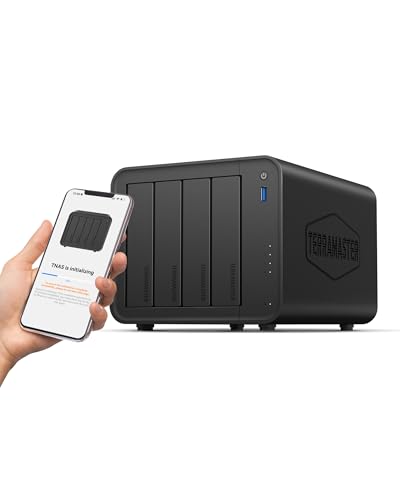 TERRAMASTER F4-425 4-Bay NAS Intel x86 Quad-Core CPU 4GB RAM (Diskless) | 2.5GbE LAN, Network Attached Storage Multimedia Server for Home UsersNew · checked | 4 bays · USB | £319.99£80.00/bay | £299.99 | RRP discount onlyAmazon reference price £399.99 | Buy on Amazon |
| TERRAMASTER 2/4-Bay NAS Storage – Intel x86 Quad-Core CPU, 4GB RAM, 2.5GbE LAN, Network Attached Storage Multimedia Server for Home Users (Diskless) (4Bay, F4-425)New · checked | 4 bays · USB | £791.11£197.78/bay | £638.27 | Above our low | Buy on Amazon |
The listing’s condition and last check are shown on each row. Prices and availability may change at checkout.
Is it really a deal?
No recently checked listing has reached our recorded low. We compare the same Amazon listing and condition against earlier prices we recorded. Near our low means within 3% of that low. An Amazon reference price shows the retailer’s comparison figure. Check the retailer for any current promotion or access requirements.
Keep the model name exact before comparing prices
With NAS drives, the model code is not a minor detail. A base model, a Plus model and sometimes a Pro variant can look almost identical in search results, yet differ in the parts that affect day-to-day use. Before you compare the F4-425 with another listing, check the full product title, the rear ports shown in the listing photos, and the model number on the manufacturer’s page. If the page says F4-425, do not assume it is the same as an F4-425 Plus or any other revision.
For a safe comparison, look at the CPU family, installed memory, maximum memory if the maker publishes it, drive-bay count, supported drive types, network ports and any expansion or cache options. If the seller page is sparse, the manufacturer’s PDF or specification page is the better source. This is especially important if you plan to run more than file sharing, such as photo indexing, media serving, surveillance, container apps or multiple backup jobs. Those uses can expose differences that do not matter on a basic spec list but do matter in practice.
Decide whether the base F4-425 is enough or whether Plus makes more sense
The main reason to stay with the base model is simplicity. A four-bay NAS is already a useful step up from a two-bay unit because you can separate capacity, redundancy and future growth more flexibly. If your main goal is a central place for family documents, PC backups, Time Machine or similar backups, and a few shared media folders, the base model is usually the first place to look.
Choose the Plus version instead if you expect the NAS to do more than store files. A Plus model may offer a faster platform, more memory, better networking or extra features that make a difference once you start running more tasks at once. The trade-off is cost and potential overbuying. For example, if the NAS will sit in a cupboard, back up laptops overnight and stream a small media library, paying extra for a Plus model may not be justified. If it will handle several users, multiple services or heavier indexing, the stronger variant can be the more sensible buy even if it costs more at the outset.
The practical way to judge this is to list your jobs in order of importance. File sharing plus backup is a base-model job. File sharing plus backup plus containers plus media serving is closer to Plus territory. If you are unsure, compare the exact port list and memory configuration first, because network speed and RAM are often the quickest indicators of whether the base model will feel sufficient after setup.
Check the four-bay configuration against the alternatives that fit better
A full four-bay NAS makes sense when you want a balance between capacity and protection. With four drives, you can choose a redundancy-oriented setup, a mixed-capacity layout or a more capacity-focused approach, depending on what the NAS supports. That flexibility is why a four-bay box often suits home offices and small households better than a two-bay unit. It is also why a four-bay unit can be the sweet spot before you step up to six bays or more.
Compared with a 2-bay NAS, the F4-425 class gives you more room to spread risk and grow later. Compared with a 6-bay NAS, it is usually easier to start with and may use fewer drives, but it gives you less room for future expansion and less flexibility if your storage needs rise quickly. A 6-bay model can make more sense if you expect large media collections, multiple users or a long upgrade path. An 8-bay model is usually only worth considering when you know you will need substantial capacity or want a more elaborate storage layout.
If you are comparing the F4-425 with the F4-424 Pro, the question is whether the older or Pro-branded model gives you a better mix of ports, memory and price for your use case. If you are comparing it with the F6-424 or F6-425 Pro, ask whether the extra two bays are genuine future-proofing or just unused overhead. Paying for bays you never populate can be poor value, but running out of space too soon can be more expensive later.
Match drive choice, RAID and noise expectations to your household
NAS buyers often focus on the enclosure and forget the drives, yet the drive choice can change the whole ownership experience. Check whether the F4-425 supports the drive sizes and types you plan to use, and confirm whether it is intended for 3.5-inch HDDs, 2.5-inch SSDs, or both. The listing should also make clear whether drives are included or sold separately. If you are pricing the system, remember that the enclosure is only part of the total cost.
For RAID or similar redundancy modes, confirm what the NAS operating system supports rather than assuming every four-bay model offers the same choices. RAID is not a backup, but it can reduce downtime after a single drive failure. If your priority is simple protection for important files, a redundancy-focused layout may be sensible. If your priority is maximum usable space, a less redundant arrangement may look attractive but leaves less safety margin. Always keep an external or cloud backup as well.
Noise and power matter too, especially in a study or lounge. A four-bay unit can be quiet enough for home use, but the real-world result depends on the drives you fit, the cooling design and how often the system is active. Check the manufacturer’s acoustics and power information if published, and compare that with your likely location. A NAS in a bedroom or living room needs a different balance from one hidden in a utility cupboard.
Use the listing and manufacturer page together before you buy
The most useful buying habit is to cross-check the retailer listing against the official specification page. Use the listing for the exact product code, included accessories, product images and bundle details. Use the manufacturer page for interfaces, drive support, system memory, operating system features and any limitations. If either source is unclear, treat the missing detail as unresolved rather than guessing.
This approach also helps when a sibling page is a better fit. If you realise you only need two drives, a 2-bay NAS may be cheaper and simpler. If your needs are expanding fast, a 6-bay NAS or 8-bay NAS may be the better long-term buy even if the base F4-425 looks attractive today. The point is to buy the right chassis for the job, not simply the nearest four-bay box on the page.
Frequently asked questions
How do I tell the base F4-425 from a Plus model?
Check the exact model code in the product title, then verify the CPU, memory, network ports and rear-panel photos against the manufacturer’s specification page. Closely named models can differ in ways that matter once you start using the NAS.
Is a four-bay NAS better than a two-bay unit?
Not always, but it usually gives more flexibility for capacity and redundancy. A two-bay model can be enough for simple backups and shared files, while a four-bay model is better if you want room to grow or a more flexible storage layout.
Should I buy the F4-425 or move up to a 6-bay model?
Choose the four-bay model if your current needs are modest and you value a simpler, lower-entry setup. Move to 6 bays if you expect your storage needs to rise quickly, or if you want more expansion headroom from the start.
Do I need to buy drives from the same listing?
No. Many NAS listings are for the enclosure only. Check whether drives are included, and if not, verify drive type, capacity and compatibility separately before you buy.