Black Friday 2026
6-Bay NAS Black Friday Deals UK 2026
Prices checked
Amazon UK’s 2026 Black Friday sale runs from 19 to 30 November. Black Friday is 27 November. Prices below come from the latest available listing checks.
As an Amazon Associate we earn from qualifying purchases. Prices and availability come from Amazon.co.uk as of the last update and may change.
A 6-bay NAS sits in the middle of a sensible home or small office storage plan. It gives you enough drive bays to build a flexible array without jumping straight to a larger, more expensive chassis, but it also asks you to think carefully about capacity planning, RAID overhead and the rest of the network budget. The key question is not just how many bays you get, but how much usable space you will have after protection, how quickly the network can move data, and whether your drive spend should go into fewer larger disks or more smaller ones. If you are comparing nearby options, a 4-bay model is usually simpler and cheaper, while an 8-bay unit is better if you expect your data set to keep growing or want more room for expansion.
Matching Amazon UK listings


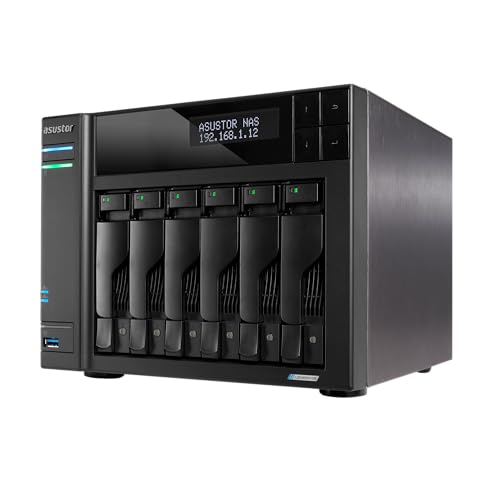


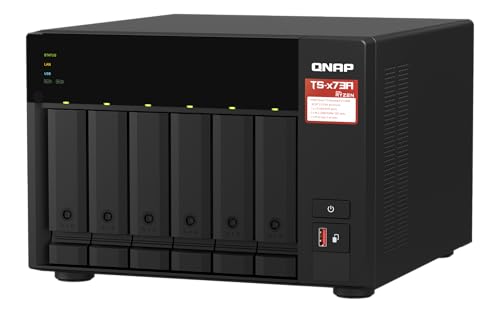


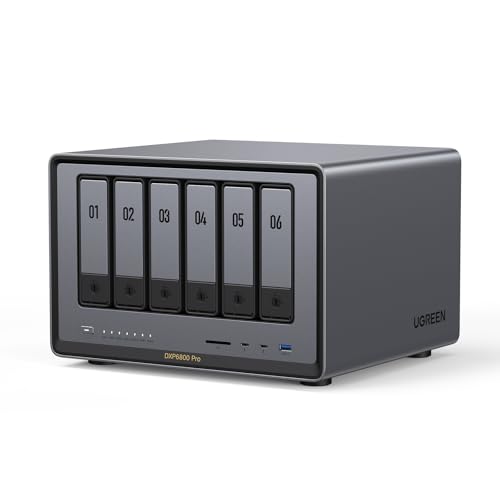


The listing’s condition and last check are shown on each row. Prices and availability may change at checkout.
Is it really a deal?
6 listings are at or near our recorded low. We compare the same Amazon listing and condition against earlier prices we recorded. Near our low means within 3% of that low. An Amazon reference price shows the retailer’s comparison figure. Check the retailer for any current promotion or access requirements.
Start with the usable capacity you actually need
With six bays, the easiest mistake is to count raw drive size rather than usable space. RAID choice changes the result a lot. For example, in a dual-parity setup such as RAID 6 or Synology SHR-2 style protection, the equivalent of two drives is used for redundancy, so a six-drive array leaves capacity for four drives. That is useful if you want protection against more than one disk failure, but it also means the total drive budget has to stretch further to get the same usable space.
As a practical example, six 8 TB drives do not give you 48 TB of usable storage in a dual-parity array. You should expect something closer to the usable space of four drives, before formatting and file-system overhead. If you only need a modest media library or backup target, a 4-bay NAS can be a better value because you may not need the extra chassis cost. If you already know that you will outgrow 4 bays, a 6-bay unit can be the more efficient stopgap because it avoids an immediate move to 8 bays.
Choose the array layout before you buy the drives
The right 6-bay layout depends on whether you want maximum capacity, more fault tolerance, or an easier future upgrade path. RAID 5 uses one drive worth of parity, so it gives more usable space than dual parity, but it is less forgiving if a second drive fails during rebuild. RAID 6 uses two drives for parity, which reduces usable space but gives a wider safety margin. If your data is important and rebuild times are likely to be long, dual parity is often the more cautious choice.
Some NAS brands also support hybrid schemes that let you mix disk sizes more flexibly, but you should verify exactly how the vendor calculates usable capacity and expansion. Check the manufacturer’s compatibility list, the controller limits, and whether the system supports hot-swap, online expansion, and migration between RAID levels. A 6-bay model is particularly useful when you want to begin with four drives and leave two bays empty for later growth, but only if the platform supports that plan cleanly. If you expect to add drives soon after purchase, compare whether a 4-bay NAS with larger disks would be cheaper overall than buying a 6-bay chassis and several smaller disks now.
Budget for the network as well as the enclosure
The drive budget is only part of the cost. You also need to think about the network side, because a fast array can still feel slow on the wire. A single 1GbE connection will cap real-world transfer rates well below what a multi-disk array can deliver, so a 6-bay NAS with dual parity may be underused if your main devices still connect over basic gigabit networking. If the NAS has 2.5GbE, 10GbE, or link aggregation support, verify whether your router, switch, and client devices can actually use it.
This matters most when the NAS is not just a backup box. If you want to edit files directly over the network, serve multiple users, or run several services at once, network bottlenecks can be more limiting than disk speed. In that case, compare the total cost of the NAS, the drives, and any required switch upgrade. Sometimes an 8-bay model only makes sense because it is being bought alongside a better network, while a 6-bay unit is the smarter middle ground when you want more headroom without paying for a larger chassis and a more complex switch setup.
Check the features that affect day-to-day ownership
Do not rely on the bay count alone. Confirm the supported drive types, maximum single-drive size, memory limits, processor family, M.2 or SSD cache support if relevant, and whether the unit accepts expansion shelves. These details determine whether the NAS is a simple file store or a platform that can scale with your needs. For a 6-bay NAS, also check noise and power considerations in the specification sheet, especially if it will sit in an office or living space.
The manufacturer page and the live listing should agree on the basics: bay count, network ports, supported RAID modes, and any included accessories. If they differ, trust the manufacturer documentation and treat the listing as shorthand. Look for wording around backup applications, snapshot support, and remote access, but verify the exact software features on the vendor site rather than assuming every model in a range includes them. This is especially important when comparing a 6-bay NAS with related 4-bay or 8-bay siblings, because the more capable chassis in a family does not always share the same software or port configuration.
When a nearby alternative is the better buy
A 2-bay NAS is the better choice if your aim is simple backup or a small personal archive and you do not need much growth. A 4-bay NAS is often the best value for home users who want redundancy but do not want to commit to dual-parity overhead across six drives. An 8-bay NAS becomes more attractive when you are planning larger capacity, more users, or a longer upgrade horizon, because the extra bays can make future expansion easier and can reduce the need to replace all your drives at once.
For ASUSTOR shoppers, the same logic applies across adjacent models. A smaller AS1204T may suit a basic starter setup, while an AS5402T or AS5404T can make more sense if your priority is a compact feature set with fewer bays. If you are building around a broader storage plan, an AS6702T or AS6704T may be worth comparing if you need different performance or expansion characteristics. The right answer is the model that matches your bay plan, your network, and your drive budget, not simply the biggest chassis available.
Frequently asked questions
Is dual parity worth it on a 6-bay NAS?
It is often worth considering if the data is important or rebuild times may be long. You give up the equivalent of two drives in usable capacity, but you gain more protection than single-parity RAID. Check whether your chosen NAS supports RAID 6 or an equivalent hybrid mode before planning the array.
Should I buy all six drives at once?
Not always. If the NAS supports gradual expansion, you can start with fewer drives and add more later, but only if the RAID layout and capacity plan still make sense. Make sure the model supports the migration path you want and that the eventual usable space will still justify the extra bays.
When is a 4-bay NAS better than a 6-bay model?
A 4-bay NAS is usually better when cost, simplicity, and lower drive spend matter more than future expansion. If you can meet your storage target with four larger drives and do not need dual-parity across six disks, it may be the more efficient purchase.
What should I verify on the product page before buying?
Confirm the bay count, supported RAID modes, network ports, maximum drive size, RAM limits, expansion support, and any software features you care about. Then compare those details with the manufacturer specification sheet so you are planning from the same set of facts.