Black Friday 2026
PCIe 4.0 SSD Black Friday Deals UK 2026
Prices checked
Amazon UK’s 2026 Black Friday sale runs from 19 to 30 November. Black Friday is 27 November. Prices below come from the latest available listing checks.
As an Amazon Associate we earn from qualifying purchases. Prices and availability come from Amazon.co.uk as of the last update and may change.
A PCIe 4.0 SSD is only a good buy if your system can use it properly. Start by checking the M.2 slot, the PCIe generation it supports, whether it shares lanes with other ports, and whether the drive will have enough cooling in the case or laptop. Then match the drive to the job. A fast Gen4 model makes sense for heavy file transfers, large project scratch space and games libraries, but it is not automatically the best choice for every PC. If your machine only supports PCIe 3.0, or if the slot runs hot and cramped, a cheaper or cooler alternative may be the better fit.
Matching Amazon UK listings


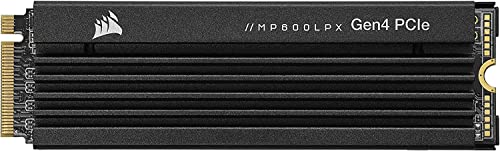


The listing’s condition and last check are shown on each row. Prices and availability may change at checkout.
Is it really a deal?
11 listings are at or near our recorded low. We compare the same Amazon listing and condition against earlier prices we recorded. Near our low means within 3% of that low. An Amazon reference price shows the retailer’s comparison figure. Check the retailer for any current promotion or access requirements.
1) Check the slot before you compare drives
The first step is compatibility. A PCIe 4.0 SSD is normally an M.2 NVMe drive, so you need an M.2 slot that supports NVMe rather than only SATA. Most Gen4 drives use the 2280 size, but shorter or longer formats do exist, so confirm the length your board or laptop accepts. Check the motherboard manual or the laptop specification page for the exact M.2 keying, supported lengths, and whether the slot is wired for PCIe 4.0 x4, PCIe 3.0 x4, or something more limited.
It is also worth checking whether the slot shares bandwidth with other devices. On some boards, using one M.2 socket can disable a SATA port or reduce the bandwidth of another slot. If you plan to add several drives, read the lane-sharing notes carefully in the manufacturer manual rather than relying only on the retail listing. A Gen4 SSD will still work in a Gen3 slot, but it will be limited by that slot, so buying a faster drive than the platform can use may not be worthwhile.
2) Match cooling to the way you use the drive
Gen4 drives can run warmer than older SATA SSDs or slower NVMe models, especially in thin cases, small-form-factor builds and laptops. Before buying, check whether the board includes an M.2 heatsink, whether the drive comes with one, and whether there is enough clearance under a graphics card or shroud for it to fit. Some retail listings show a heatsink version and a bare version of the same model, which matters if your board already has its own thermal cover.
For light everyday use, a bare drive may be fine if there is decent airflow. For a workstation, games library or repeated large transfers, a heatsink or strong case airflow is more useful. If the drive will sit under a GPU or next to another warm component, cooling becomes a practical buying factor rather than an accessory. Always check the drive’s installation guidance from the manufacturer so you do not double-stack a board heatsink and the SSD’s own cooler if that would create a clearance problem.
3) Buy for the workload, not just the interface
The right Gen4 SSD depends on what you do with it. For an operating system drive and general desktop use, many buyers should focus on sensible capacity and a reputable controller rather than chasing the most aggressive specification sheet. For creative work, virtual machines, large game libraries or frequent file copies, you may want a higher-capacity model because larger drives often maintain steadier behaviour under sustained use and simply give you more room before the drive fills up.
It is also wise to check endurance figures, written as TBW or sometimes DWPD on enterprise-oriented products. These are listed by the manufacturer and help you compare how much writing the drive is designed to handle over time. If you edit video, work with scratch files or move large datasets regularly, that figure matters more than marketing language. For a boot drive used mainly for browsing, office work and a few games, endurance is still relevant but less likely to be the deciding factor. Make sure the capacity you buy leaves comfortable free space, because SSDs often behave better when they are not nearly full.
4) Compare the feature set carefully, not just the label
A retail page may say PCIe 4.0 SSD, but the useful details are elsewhere. Check the form factor, interface, NAND type if the manufacturer publishes it, whether the drive uses DRAM or a host-memory approach, and whether the product is sold with or without a heatsink. None of these details is a universal winner, but they do affect suitability. A drive aimed at compact builds may prioritise low-profile design, while a performance-focused model may assume stronger cooling and a desktop motherboard.
If you are choosing between sibling pages on this site, the capacity filter matters. A 1TB SSD can suit a boot drive or a modest games library. A 2TB SSD is often the more flexible desktop choice because it leaves breathing room for modern game installs and project files. 3.84TB and 7.68TB models make more sense when you need a large single volume and do not want to manage multiple drives. The right choice is usually the smallest capacity that still leaves you enough headroom, because that keeps cost and heat more manageable.
5) When a close alternative is the better buy
Sometimes the best answer is not a Gen4 SSD at all. If your board only supports PCIe 3.0, a Gen4 drive may still be compatible, but a well-priced PCIe 3.0 model or a cooler, lower-cost Gen4 drive can make more sense. Likewise, if your system has only one M.2 slot and poor airflow, a drive with a simpler thermal profile may be a better fit than a flagship-style model.
For shoppers comparing the related options on this site, use the workload to narrow things down. A model such as Corsair MP700 Pro or Lexar NM1090 Pro may appeal if you need a more performance-led Gen4 option, while Kingston KC3000 and Lexar NM790 can be worth comparing on the balance of capacity, cooling needs and value. The right pick is the one that fits your slot, your thermals and your workload, not simply the newest name on the list.
Frequently asked questions
How do I check if my PC supports a PCIe 4.0 SSD?
Look in the motherboard or laptop specifications for an M.2 NVMe slot that supports PCIe 4.0 x4 and the correct drive length, usually 2280. The retail listing alone is not enough, because lane sharing and slot limits are often explained only in the manual.
Do I need a heatsink for a Gen4 SSD?
Not always. It depends on the case, airflow and workload. A heatsink is more useful for sustained transfers, compact cases and slots that sit under a graphics card or other warm components. Check whether your board already includes one before buying an SSD with its own cooler.
Is a larger SSD always better?
Not always, but larger capacities can be more practical if you install many games, edit media or use the drive as a scratch disk. They also leave more free space, which is helpful because SSDs generally behave better when they are not close to full.
When should I choose a different type of drive instead?
If you need external portability, a USB SSD or portable drive may be better. If your system only supports SATA, a SATA SSD is the sensible choice. If you need lots of cheap bulk storage rather than fast access, a hard drive or a NAS setup may be more suitable.