Black Friday 2026
Seagate Exos X18 Black Friday Deals UK 2026
Prices checked
Amazon UK’s 2026 Black Friday sale runs from 19 to 30 November. Black Friday is 27 November. Prices below come from the latest available listing checks.
As an Amazon Associate we earn from qualifying purchases. Prices and availability come from Amazon.co.uk as of the last update and may change.
If you want a Seagate Exos X18, start by matching the exact interface and part number, not just the capacity label. The X18 family includes enterprise-class 3.5-inch drives, but listings can differ on SATA or SAS, sector format, firmware and refurbishing status. For a NAS, that matters more than the headline name. Use the manufacturer datasheet and the Amazon listing together to confirm the exact model code, then decide whether a new drive or a renewed one fits your risk tolerance and budget.
Matching Amazon UK listings


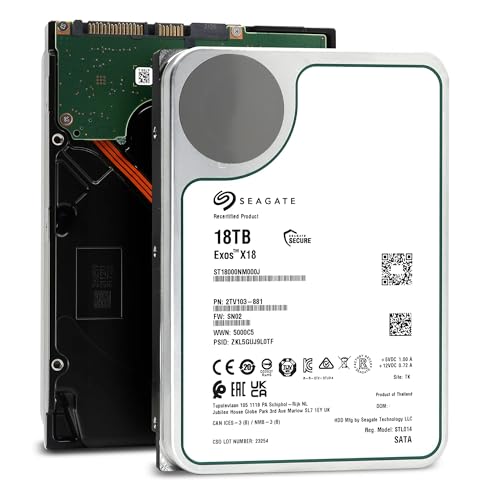

The listing’s condition and last check are shown on each row. Prices and availability may change at checkout.
Is it really a deal?
No recently checked listing has reached our recorded low. We compare the same Amazon listing and condition against earlier prices we recorded. Near our low means within 3% of that low. An Amazon reference price shows the retailer’s comparison figure. Check the retailer for any current promotion or access requirements.
1. Confirm the exact X18 variant before you compare anything else
Exos X18 is a product family, not a single universal part. One listing may be SATA, another may be SAS, and a NAS will normally need the same interface as the bay or controller. Check the listing title, the technical table and the item code against the Seagate datasheet or product page. If the seller only says “Exos X18” without a full part number, treat that as incomplete.
Look for the capacity, interface, form factor and any sector format details. A 3.5-inch enterprise drive is not the same thing as a 2.5-inch SAS drive, even if both are used in storage systems. If your NAS supports only SATA bays, a SAS model is the wrong choice. If your server has a SAS controller, either interface may work, but you should still verify the backplane and controller compatibility first.
A practical check is to compare the exact part code on the listing with the code in the manufacturer’s spec sheet. If those do not match, do not assume the drive is the same version. That is especially important when buying multiple units for RAID, where mixed variants can complicate compatibility and later replacements.
2. Choose new or renewed based on how much uncertainty you can accept
New drives suit buyers who want the cleanest spec match and the simplest support path from the retailer. They are the safer option when you are building a RAID set from scratch, replacing a failed member in an important array, or buying only one drive and need the least ambiguity about condition.
Renewed drives can make sense if you are cost-conscious and comfortable checking the listing carefully. The key tradeoff is not just price, but history. A renewed drive may be perfectly suitable for a secondary NAS, a less critical backup target or a lab system, but you should read the refurbisher notes closely. Look for what is included, whether the drive has been tested, and whether any original accessories or packaging are missing.
For renewed listings, pay extra attention to the exact model code and the seller description. If the drive is described loosely, you may not know whether you are getting the same interface, firmware branch or capacity block size as the new version. That matters when mixing drives in the same pool. If you are replacing an array member, the safest approach is to match the original drive as closely as possible, or confirm that your NAS allows mixed models without issue.
3. Match the drive to the job: NAS, archive, backup or mixed use
An Exos X18 is typically chosen when you want an enterprise-style hard drive for a NAS, server or bulk storage box. That does not automatically mean it is the best fit for every home setup. If your aim is a simple two-bay NAS for family files, a NAS-focused line such as Seagate IronWolf Pro may be the more straightforward comparison because it is positioned around multi-drive network storage. If you already know you need the Exos family, stay with the exact interface and part number rather than comparing only on brand.
If the drive is for surveillance recording, Seagate SkyHawk is the more relevant alternative because its design focus is different. For general media storage, backup or cold archives, capacity-focused sibling pages such as 10TB, 12TB, 14TB, 16TB or 18TB hard drive listings may be more useful if you are simply choosing size first and brand second. Those pages help when the main decision is how much space you need, not which enterprise model family to buy.
If you are building a single-disk DAS enclosure rather than a NAS, the choice changes again. Direct-attached storage usually cares less about network features and more about interface fit, enclosure compatibility and value per terabyte. In that case, compare the Exos X18 against the enclosure’s supported interface and against cheaper alternatives only if they meet the same connection standard.
4. Check the practical compatibility points that listings often leave out
Before ordering, verify the things a product title may not make obvious. Confirm the drive size, interface type, and whether the listing indicates SATA or SAS. Check if your NAS or controller supports the sector format shown on the spec sheet. Some systems are picky about 512e and 4Kn combinations, so it is worth checking the manufacturer’s compatibility notes, not guessing from the label.
Also confirm physical fit. Exos X18 drives are 3.5-inch units, so they need bays and trays that support that size. A 2.5-inch SAS drive is a different category entirely and is not a substitute unless your system explicitly supports it with the right adapter or backplane. If you are replacing a drive in an existing array, verify that the new model matches the old one closely enough for your controller and NAS firmware.
Finally, think about total cost rather than just the item on the page. A new drive may cost more upfront but reduce uncertainty. A renewed drive may lower the purchase price, but if you need to replace it sooner or spend more time checking compatibility, the saving can narrow. That is why exact model matching matters so much on enterprise drives like the Exos X18.
5. Use the listing details to compare like with like, not headline with headline
When comparing Amazon UK listings, focus on the fields that prove identity: full model number, capacity, interface, condition and seller description. If one listing is new and another is renewed, do not compare them as if they are identical products. Treat them as separate buying choices with different certainty levels.
A useful method is to open the manufacturer spec sheet alongside the listing and compare each line one by one. If the listing omits a detail you care about, such as the exact interface or sector type, look for it in the product images or Q&A, but only rely on it if it is stated clearly. For storage, incomplete information is a warning sign, not a gap to ignore.
If your shortlist includes the Exos X18 and a sibling page drive, decide whether you are buying for interface match, capacity, or use case. That keeps you from paying for enterprise features you will not use, or from choosing a cheaper drive that does not actually fit your NAS or controller.
Frequently asked questions
How do I know I am looking at the right Exos X18 listing?
Match the full model or part number, the interface type, the capacity and the form factor against the manufacturer’s datasheet. If any of those do not line up, do not assume the listing is the same drive.
Is a renewed Exos X18 always a bad choice?
No. It can be a sensible option for less critical storage if the seller states the exact model clearly and the condition information is strong. It is just a better fit when you can tolerate more uncertainty than with a new drive.
Should I choose Exos X18 or IronWolf Pro for a home NAS?
If your main goal is a NAS-specific drive and you do not need the exact Exos part, IronWolf Pro is the more direct comparison. Choose Exos X18 when you specifically want that model family and can verify the interface and part number.
Can I use a SAS version in a normal SATA NAS?
Usually no. The controller and backplane must support SAS. Check the NAS or enclosure specifications before buying, because SATA and SAS are not interchangeable in every system.