Black Friday 2026
WD Black SN8100 Black Friday Deals UK 2026
Prices checked
Amazon UK’s 2026 Black Friday sale runs from 19 to 30 November. Black Friday is 27 November. Prices below come from the latest available listing checks.
As an Amazon Associate we earn from qualifying purchases. Prices and availability come from Amazon.co.uk as of the last update and may change.
The WD Black SN8100 is the kind of SSD where the first buying decision is not capacity or headline speed, but compatibility. Before you compare offers, check that your motherboard or laptop supports the right PCIe generation, that the drive will physically fit with your cooler or chassis airflow, and that you are looking at the exact heatsink or bare-drive version you want. Those checks matter more than chasing a small price difference, because a fast Gen 5 drive that cannot run properly in your system is poor value whatever the sticker says.
Matching Amazon UK listings

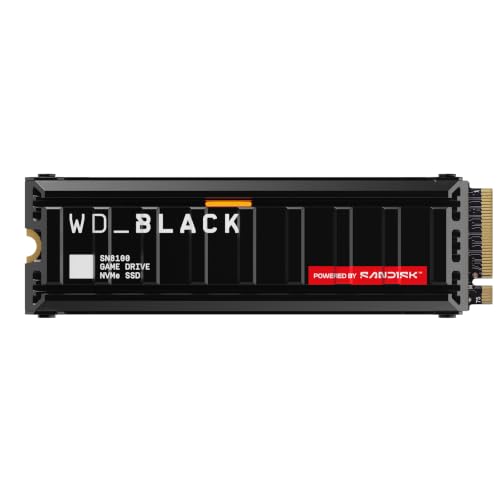

The listing’s condition and last check are shown on each row. Prices and availability may change at checkout.
Is it really a deal?
No recently checked listing has reached our recorded low. We compare the same Amazon listing and condition against earlier prices we recorded. Near our low means within 3% of that low. An Amazon reference price shows the retailer’s comparison figure. Check the retailer for any current promotion or access requirements.
Start with host compatibility, not the offer price
The key question is whether your device can use a PCIe 5.0 NVMe SSD properly. A Gen 5 drive should work in many PCIe 4.0 M.2 slots, but it will be limited to the host’s interface speed. That may still be perfectly sensible if you are buying for compatibility now and an upgrade path later, but it changes the value calculation. Check the motherboard manual or laptop specifications for the M.2 slot standard, lane count, and any note about sharing bandwidth with other ports.
Also confirm the slot uses an M.2 NVMe connection rather than a SATA-only M.2 bay. The physical connector can look similar, so the manual is the safest source. If your system only supports PCIe 4.0, a WD Black SN7100 or WD Black SN850X may be a more balanced choice unless you specifically want a Gen 5 drive for future platforms. If you are choosing between capacities, compare the exact model name and size on the listing with the manufacturer page, because SSD families often share branding while differing in controller, NAND, cache behaviour, and endurance classes.
Check thermal clearance and cooling before you buy
High-speed NVMe drives can run warm, especially in compact cases, laptops, and slots located close to a graphics card or chipset heatsink. Before ordering, verify whether the SN8100 listing is for the bare drive or the heatsink version. That detail matters because a heatsink model may not fit under an existing motherboard cover, and a bare drive may be a better choice if your board already has an M.2 shield or if space is tight.
Measure the physical clearance around the slot. Look for the height of adjacent components, whether the slot sits under the GPU, and whether your case or laptop has enough airflow. If the drive will live in a console, small-form-factor PC, or notebook, the safer option is often the simplest one: a version that fits cleanly without forcing you to remove existing thermal hardware. If you cannot confirm clearance, it is wiser to choose a lower-profile drive or a different model than to assume it will work after purchase.
The exact heatsink option is worth confirming on the product page and in the manufacturer’s documentation. Some listings group multiple versions together, and the pictures do not always make the variant obvious. Compare the part number, not only the product title, before you commit.
Match the capacity to how you actually use the drive
Do not buy purely on the largest number if your workload does not need it. A smaller SSD can be better value for an operating system drive, a few favourite games, or a working folder, while a larger model suits video projects, large game libraries, or scratch workloads. If you are comparing 1TB, 2TB, 3.84TB or 7.68TB options on sibling pages, think about how much free space you want to keep in reserve. Leaving some headroom generally makes day-to-day use easier and avoids ending up with a nearly full drive.
For many desktop buyers, 2TB is the practical middle ground because it gives room for a modern OS, apps and several large games without forcing immediate expansion. A 1TB model can still make sense for a boot drive, especially when you already have bulk storage elsewhere. The larger enterprise-style capacities are only sensible if you genuinely need them and have a system that can physically and electrically support the drive. Always confirm the exact capacity on the box and in the listing, because capacity is one of the easiest details to misread when several sizes sit on the same product family page.
Decide whether SN8100 is the right kind of upgrade
Choose the SN8100 if your aim is to buy into the newest host interface and your system can keep up. If your machine is a generation behind, the better buy may be the WD Black SN850X, which is often the more natural fit for PCIe 4.0 platforms. If you are building a higher-end rig that already has a PCIe 5.0 slot and the clearance to match, the SN8100 is the sort of drive you compare directly with other Gen 5 options such as the Corsair MP700 Pro.
If your use case is storage for a NAS or a system that values lower power draw and consistency over peak desktop speed, a WD Red SN700 may be more suitable than a Black-series drive. That is especially true when the drive is meant for long running, multi-bay use rather than a fast local scratch disk. In other words, choose the drive family that matches the job, not the one with the most aggressive branding.
Price comparison only makes sense once the fit question is settled. A cheaper listing for the wrong heatsink variant, or a drive your system cannot run at its intended speed, is not a real saving.
Use the listing details to verify before checkout
Before you buy, compare the seller listing with the manufacturer specification page for the exact model code. Check the interface, form factor, capacity, and whether the listing says bare drive or heatsink. If the page mentions bundled accessories, region-specific packaging, or an updated revision, make sure those details are acceptable to you. For SSDs, a small wording difference can indicate a different thermal design or a different storage size.
If you are moving data from an older drive, also check whether you will need an M.2 screw, standoff, or a motherboard slot cover that is supplied separately. These are minor details, but they can delay a build or upgrade. When in doubt, keep your old drive installed until you have confirmed the new one is recognised correctly in BIOS or UEFI and that your operating system sees the full capacity. That way you reduce the risk of ending up with an awkward parts mismatch.
Frequently asked questions
How do I know if my PC supports the WD Black SN8100?
Check the motherboard or laptop manual for an M.2 NVMe slot with PCIe 5.0 support. If it only lists PCIe 4.0, the drive may still work, but it will run at the platform’s limit rather than full Gen 5 speed.
Should I choose the heatsink version?
Only if your system has the physical room for it and does not already use a tall motherboard M.2 cover. If space is tight, or your board already provides cooling, the bare drive may be the safer option.
Is a larger capacity always better value?
Not necessarily. Pick the size that fits your actual storage needs and keep some free space in reserve. For many desktop users, 2TB is a practical balance, while 1TB can suit a boot drive and larger capacities suit heavier workloads.
When is a different model a better choice?
If your system is PCIe 4.0 only, the WD Black SN850X may be a more sensible match. For NAS use, the WD Red SN700 is usually the more relevant family. If you want another Gen 5 option, compare the Corsair MP700 Pro as a direct alternative.